HP All in One Desktop Computer for Home, Intel Celeron J4025, 21.5 inch FHD Anti-Glare, WiFi 6, 32 GB DDR4, 1 TB SSD, 1TB USB Flash Drive, Home PC, Wired KB & Mouse, Windows 11 Pro, W/Accessories
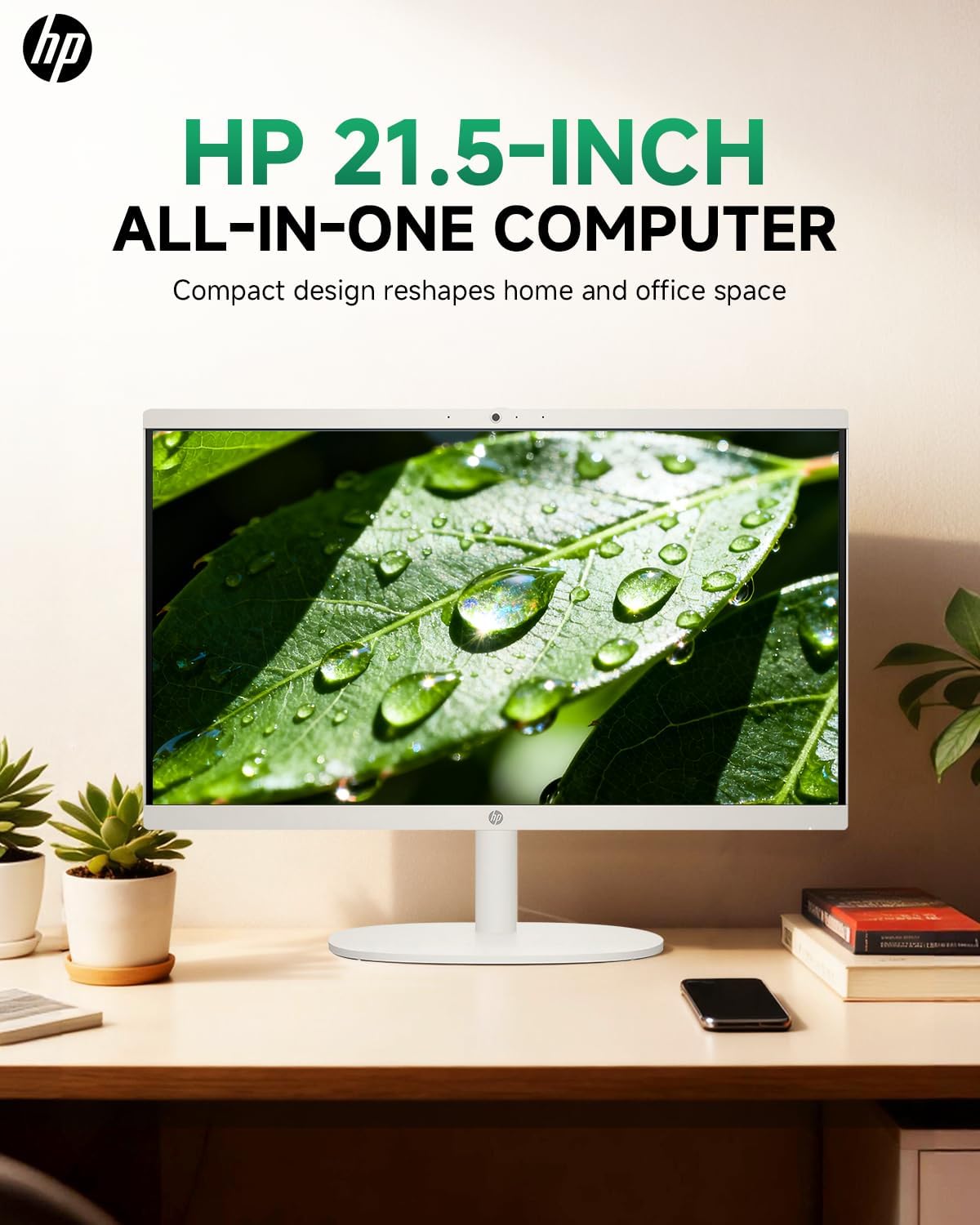
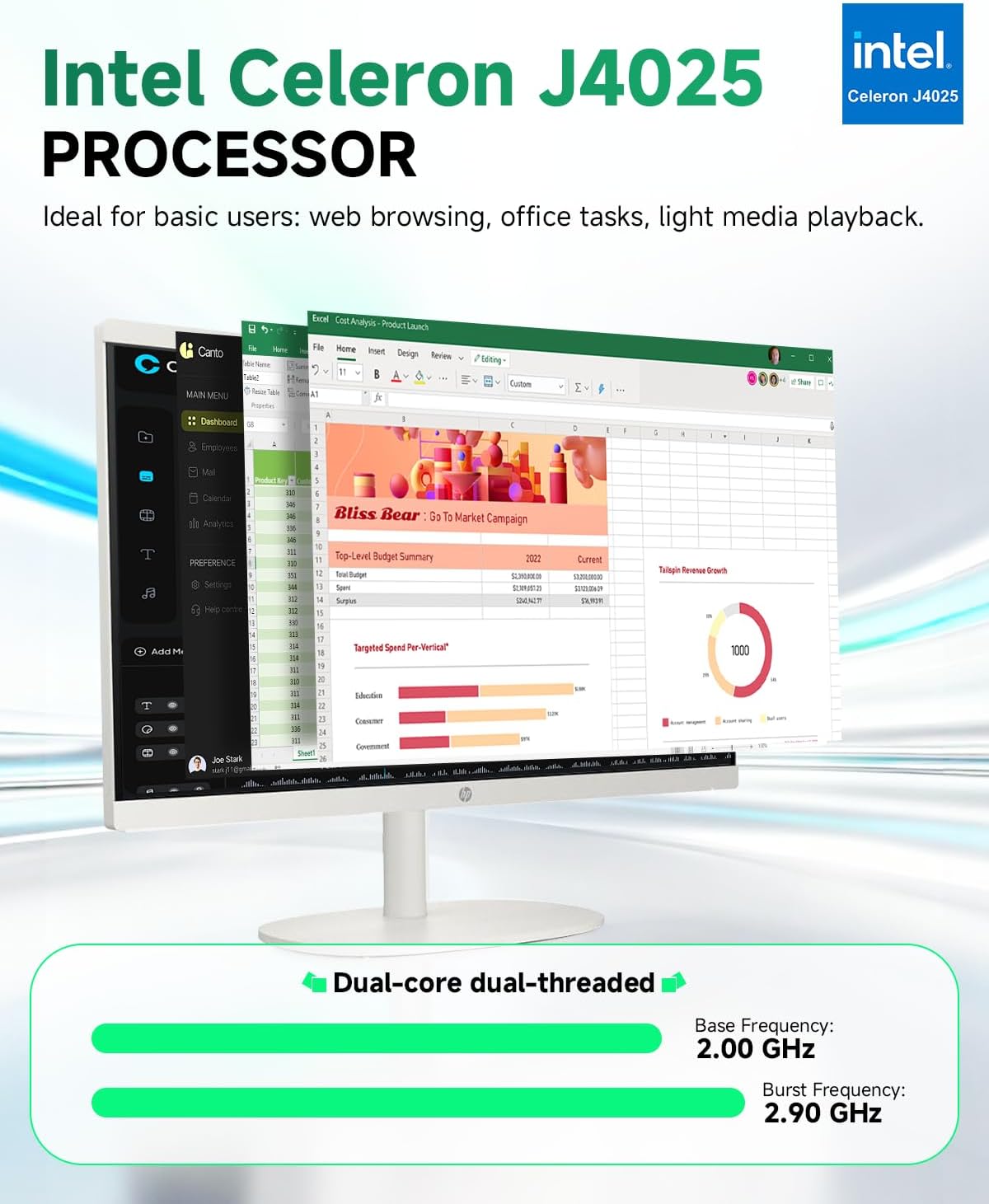
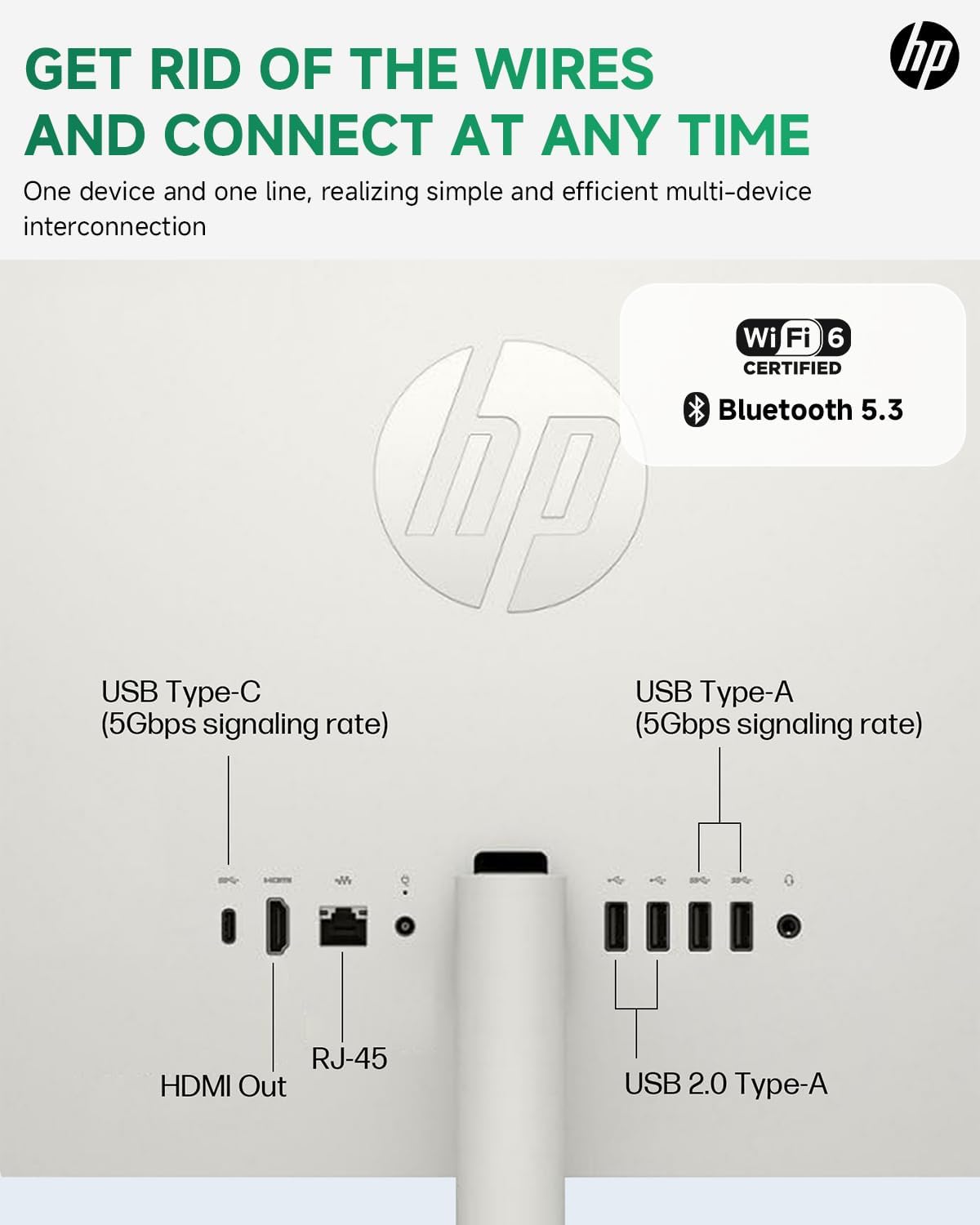
Statement: Original Seal is opened for upgrade ONLY. If the computer has modifications, then the manufacturer box is opened for it to be tested and inspected and to install the upgrades to achieve the specifications as advertised. GENERAL INFORMATION Brand: HP Model Number: 22-dg0024 Series: HP 21.5 inch All in One Computer Desktop Color: White Operating System: Windows 11 Pro Processor Model: Intel Celeron J4025 Frequency: 2.9 GHz Cache: 4 MB Display & Graphic 21.5”, FHD(1920×1080), Anti-Glare, 250Nits, 99% sRGB Intel UHD Graphics 600 Memory & Storage Capacity: 32 GB DDR4 Storage: 1 TB SSD Wireless Wi-Fi 6 (2×2) and Bluetooth 5.3 Wireless Card Feature HP Finish in Cashmere White Speakers tuned by DTS Audio HP USB Cashmere White Wired Keyboard and Mouse Combo HP True Vision 720p HD Camera with Temporal Noise Reduction and Integrated Dual Array Digital Microphones Ports 1 x USB Type-C 5Gbps signaling rate 2 x USB Type-A 5Gbps signaling rate 2 x USB 2.0 Type-A 1 x HDMI out 1 x Headphone/Microphone Combination Jack 1 x RJ-45 Physical Specifications 19.43 x 15.07 x 6.69 Inches, 9.19 lbs Included Items HP 22-dg0024 All-in-One Desktop Wired keyboard Wired mouse Power cord User manual Accessories THE PERFECT ALL-IN-ONE FOR YOUR HOME: Built for everyday tasks, the HP 21.5 inch all in one desktop computer blends computing power with elegant design. It is a space-saving, simple and beautiful all-in-one computer with convenient connection. It can meet your needs in daily office, document processing, web browsing and other needs 21.5″ FHD ANTI-GLARE PANEL: Experience stunning visuals on the 21.5” FHD IPS display of the HP all-in-one pc. Immerse yourself in vibrant colors and sharp details for an enhanced viewing experience.With 250 nits of brightness and 99% sRGB, your images and videos look vibrant and accurate UPGRADE RAM & STORAGE: With support for up to 32GB DDR4 RAM, this HP computer can easily scale with your performance needs. Smoothly run multiple applications simultaneously and deliver lightning-fast responsiveness that keeps you in the flow; 1 TB PCIe SSD delivers lightning-fast boot-up speed, enhanced storage capabilities, and support for high-definition video playback Built for the Speed of Life: With plenty of ports to connect your devices, you can stay flowing.2 x USB-A 2.0, 2 x USB-A 3.0, 1 x USB-C 3.0, Wi-Fi 6, Bluetooth 5.3. The HP True Vision HD camera with temporal noise reduction ensures crystal-clear video Windows 11 Pro: Experience enhanced productivity and security features with Windows 11 Pro. Accessories are shipped separately and are not included in the same package with the computer
Specification
Overview
Customer Reviews
Rated 0 out of 5
8 reviews
Rated 5 out of 5
0
Rated 4 out of 5
0
Rated 3 out of 5
0
Rated 2 out of 5
0
Rated 1 out of 5
0
8 reviews for HP All in One Desktop Computer for Home, Intel Celeron J4025, 21.5 inch FHD Anti-Glare, WiFi 6, 32 GB DDR4, 1 TB SSD, 1TB USB Flash Drive, Home PC, Wired KB & Mouse, Windows 11 Pro, W/Accessories
questions you ask yourself when setting up a new device get answered,(if you say it outloud).
Extremely user friendly for a change with electronic devices.
DO NOT BUY FROM WYL TECH! their computers are MODIFIED.
We had nothing but problems with this computer…it freezes…it logs you out…it would not let you complete a task. Upon calling Hewlett Packard, we were told this computer was modified therefore voiding the warranty or any help from them.Added after dealing with the seller WYL TECHWE bought this computer from WYL TECH, through Amazon. We set this computer up according to WYL TECH’s instructions. After we set it up the computer would not allow searches, would freeze, and have to be restarted after EVERY task. We contacted the manufacturer Hewlett Packard. We found out from Hewlett Packard that WYL TECH ‘s Hewlett Packard computer was MODIFIED by WYL TECH. Therefore Hewlett Packard could not help with the issues of freezing up…having to restart the computer for EVERY task. The computer obviously had problems so we returned it. AFTER returning it, WYL TECH wanted pictures of the problem so their warehouse could inspect it and fix the issue. Upon returning it we were charged a $33.00 restocking fee by WYL TECH. WYL TECH will not reimburse us the restocking fee even though WYL TECH’s computers are modified BY WYL TECH.
Literally no competition
There’s a lot to like about the HP Chromebase, but the biggest issue is that there’s nothing out there that really competes with it. There is a niche here that I believe will give users an experience they can’t have anywhere else. Sadly, many people will skip this computer as an option and I can’t blame them for that. You can do essentially everything this AIO can do on a Windows computer. What you can’t find anywhere else is a premium Chromebase product that looks good physically and gives you access to a mobile friendly orientation. I found myself really enjoying this with specific use cases. Most people need to operate everything on one system, so this might not work out for them. With that said, there are ChromeOS enthusiasts who really understand the immensely enjoyable and simplistic experience of the Google operating system. This is such a fun departure from the laptop space that I highly recommend for lovers of Chromebooks.Straight out of the box, the main selling point for me is the rotating display. I love the fact that the 21.5” Full HD display can rotate between horizontal and vertical orientation. We don’t need to go in-depth about Android apps as it is common knowledge now that ChromeOS and the Google Play Store are merged together harmoniously (to an extent). It makes a whole lot of sense from a design standpoint to be able to operate the display in two orientations for this current time in tech history. Vertical apps are prevalent in our daily use of applications and having that option to view them in a relatively similar aspect ratio is just a premium addition to the user experience. The fact that this AIO is also a touch screen display just adds to the blending of the smartphone experience onto a computing platform. It’s hypothetically seamless to transition the two together. ChromeOS as an operating system is also the most likely OS to find a way to incorporate mobile apps onto a computer seeing as Google has been trying to perfect it for years now. This is essentially a smartphone computer now. Microsoft and Apple are only beginning to come to grips on how to handle their mobile and computing integration.ChromeOS is objectively one of the best systems to browse the internet on. Afterall, the OS is named after a web browser for a reason. ChromeOS never needed hardware specs to have a smooth experience. That is still the case for web work in 2022, but with Android slowly spreading its influence over the structure of this operating system, specs are more important than they’ve ever been before. The HP Chromebase uses an Intel Pentium Gold G5600 processor with 4 GB of ram and 64 GB of SSD. It’s supported with an Intel UHD Graphics 600. Just 5 years ago, those would be impressive specs for a Chromebook. Now, it’s a potential detractor. As much as I would have liked to use this AIO for more of my daily routines, it simply cannot handle some of the workload I run on Android. This mainly applies to many of the mobile games I circulate which consist of Anime style RPGs.Seeing as gaming has left me with mixed results, I’ve found myself gravitating towards media consumption on the HP Chromebase instead. Watching Youtube videos on portrait mode while browsing through the comments section is an addicting experience. I now find myself missing this type of viewing experience when working on a landscape monitor without the extra vertical real estate. Web browsing with my finger in portrait mode is also something I’ve come to enjoy a lot more vertically than horizontally. The touch screen is extremely responsive and lucid with input. This of course isn’t something exclusively available on the HP Chromebase as anyone can rotate their monitor and work on any operating system. The big difference is the ease and convenience of which the two viewing experiences can be swapped between. For the most part, it’s seamless with the occasional one or two second delay between refreshes. There are certain times on bootup where the login menu is locked into landscape mode while the display itself is in portrait mode. It usually takes a soft reset to get things synched back to normal.The body that houses all the guts of the PC is located inside a fabric cone-shaped body that resembles a Sonos speaker. The monitor has a matte plastic finish that combines with the fabric cone to make for a rather premium appearance. A lot of personal computing options have been designed to fit this modern furniture aesthetic and this follows that trend. It’ll go really nicely in any room setting. Hidden neatly behind the display on the cone is a speaker grill. Volume is pushed straight at you from behind the monitor. It gets quite loud and surprisingly doesn’t get muffled by the monitor. On the opposite side are the ports and the power button. There are two sets of USB-C and USB A ports alongside a 3.5 mm headphone jack. The volume rockers are off the side of the cone. This is essentially a portless system as HP includes a fully Bluetooth keyboard and mouse that don’t require receivers. I haven’t plugged anything into the ports in weeks.The one often overlooked product platform that has never truly reached the potential I had envisioned for it over the years are Chromebases. If you said that word in public, I highly doubt anyone would even know what it meant. An All-in-One Chrome OS computer that not only has the simple operation of a Chromebook, but also the library of the full app store on Android, sounds like a recipe perfect for modern consumption. HP certainly hasn’t given up on the form factor as I’m reviewing the HP Chromebase 21.5 AIO in what might be the most luxurious AIO Chromebase ever made.





 Overview

Amazon Customer –
Would buy again.
My kid has commandeered the computer. Need another one now!
Margaret –
questions you ask yourself when setting up a new device get answered,(if you say it outloud).
Extremely user friendly for a change with electronic devices.
stephen Harrington –
Hp computer
What was I ordered however miss the touch screen.
Blandin Nardinger –
Very fast
This is great. Served the purpose
Kathe R. –
DO NOT BUY FROM WYL TECH! their computers are MODIFIED.
We had nothing but problems with this computer…it freezes…it logs you out…it would not let you complete a task. Upon calling Hewlett Packard, we were told this computer was modified therefore voiding the warranty or any help from them.Added after dealing with the seller WYL TECHWE bought this computer from WYL TECH, through Amazon. We set this computer up according to WYL TECH’s instructions. After we set it up the computer would not allow searches, would freeze, and have to be restarted after EVERY task. We contacted the manufacturer Hewlett Packard. We found out from Hewlett Packard that WYL TECH ‘s Hewlett Packard computer was MODIFIED by WYL TECH. Therefore Hewlett Packard could not help with the issues of freezing up…having to restart the computer for EVERY task. The computer obviously had problems so we returned it. AFTER returning it, WYL TECH wanted pictures of the problem so their warehouse could inspect it and fix the issue. Upon returning it we were charged a $33.00 restocking fee by WYL TECH. WYL TECH will not reimburse us the restocking fee even though WYL TECH’s computers are modified BY WYL TECH.
The 3AM Impulse Buyer –
Literally no competition
There’s a lot to like about the HP Chromebase, but the biggest issue is that there’s nothing out there that really competes with it. There is a niche here that I believe will give users an experience they can’t have anywhere else. Sadly, many people will skip this computer as an option and I can’t blame them for that. You can do essentially everything this AIO can do on a Windows computer. What you can’t find anywhere else is a premium Chromebase product that looks good physically and gives you access to a mobile friendly orientation. I found myself really enjoying this with specific use cases. Most people need to operate everything on one system, so this might not work out for them. With that said, there are ChromeOS enthusiasts who really understand the immensely enjoyable and simplistic experience of the Google operating system. This is such a fun departure from the laptop space that I highly recommend for lovers of Chromebooks.Straight out of the box, the main selling point for me is the rotating display. I love the fact that the 21.5” Full HD display can rotate between horizontal and vertical orientation. We don’t need to go in-depth about Android apps as it is common knowledge now that ChromeOS and the Google Play Store are merged together harmoniously (to an extent). It makes a whole lot of sense from a design standpoint to be able to operate the display in two orientations for this current time in tech history. Vertical apps are prevalent in our daily use of applications and having that option to view them in a relatively similar aspect ratio is just a premium addition to the user experience. The fact that this AIO is also a touch screen display just adds to the blending of the smartphone experience onto a computing platform. It’s hypothetically seamless to transition the two together. ChromeOS as an operating system is also the most likely OS to find a way to incorporate mobile apps onto a computer seeing as Google has been trying to perfect it for years now. This is essentially a smartphone computer now. Microsoft and Apple are only beginning to come to grips on how to handle their mobile and computing integration.ChromeOS is objectively one of the best systems to browse the internet on. Afterall, the OS is named after a web browser for a reason. ChromeOS never needed hardware specs to have a smooth experience. That is still the case for web work in 2022, but with Android slowly spreading its influence over the structure of this operating system, specs are more important than they’ve ever been before. The HP Chromebase uses an Intel Pentium Gold G5600 processor with 4 GB of ram and 64 GB of SSD. It’s supported with an Intel UHD Graphics 600. Just 5 years ago, those would be impressive specs for a Chromebook. Now, it’s a potential detractor. As much as I would have liked to use this AIO for more of my daily routines, it simply cannot handle some of the workload I run on Android. This mainly applies to many of the mobile games I circulate which consist of Anime style RPGs.Seeing as gaming has left me with mixed results, I’ve found myself gravitating towards media consumption on the HP Chromebase instead. Watching Youtube videos on portrait mode while browsing through the comments section is an addicting experience. I now find myself missing this type of viewing experience when working on a landscape monitor without the extra vertical real estate. Web browsing with my finger in portrait mode is also something I’ve come to enjoy a lot more vertically than horizontally. The touch screen is extremely responsive and lucid with input. This of course isn’t something exclusively available on the HP Chromebase as anyone can rotate their monitor and work on any operating system. The big difference is the ease and convenience of which the two viewing experiences can be swapped between. For the most part, it’s seamless with the occasional one or two second delay between refreshes. There are certain times on bootup where the login menu is locked into landscape mode while the display itself is in portrait mode. It usually takes a soft reset to get things synched back to normal.The body that houses all the guts of the PC is located inside a fabric cone-shaped body that resembles a Sonos speaker. The monitor has a matte plastic finish that combines with the fabric cone to make for a rather premium appearance. A lot of personal computing options have been designed to fit this modern furniture aesthetic and this follows that trend. It’ll go really nicely in any room setting. Hidden neatly behind the display on the cone is a speaker grill. Volume is pushed straight at you from behind the monitor. It gets quite loud and surprisingly doesn’t get muffled by the monitor. On the opposite side are the ports and the power button. There are two sets of USB-C and USB A ports alongside a 3.5 mm headphone jack. The volume rockers are off the side of the cone. This is essentially a portless system as HP includes a fully Bluetooth keyboard and mouse that don’t require receivers. I haven’t plugged anything into the ports in weeks.The one often overlooked product platform that has never truly reached the potential I had envisioned for it over the years are Chromebases. If you said that word in public, I highly doubt anyone would even know what it meant. An All-in-One Chrome OS computer that not only has the simple operation of a Chromebook, but also the library of the full app store on Android, sounds like a recipe perfect for modern consumption. HP certainly hasn’t given up on the form factor as I’m reviewing the HP Chromebase 21.5 AIO in what might be the most luxurious AIO Chromebase ever made.
Customer –
All in one
Budget friendly works best for my basics. Slim design and space saving, display quality is decent and simple all in one solution.
Johnny L –
Great for my small business
This is a great computer. Very Sleek and fast. Exactly what I needed for my small business.