

-83%
Sale!




Experience the Power of Wi-Fi 7
Step into the next generation of home Wi-Fi with the Archer BE260 Dual-Band Wi-Fi 7 Router. It is built with cutting-edge Wi-Fi 7 technology, featuring Multi-Link Operation (MLO), Multi-RUs, and 4K-QAM, ensuring exceptional speed and reliability for both wired and wireless internet connections. Whether you’re streaming Netflix, Prime Video, or Disney+, or browsing at ultra-fast speeds on your Wi-Fi 7 devices, like the iPhone 16 Pro, the Google Pixel 9, or PS5 Pro, this router delivers top-tier performance.
The dimensions for this product are 10.6 x 6 x 1.9 inches, and it weighs 1.32 lbs. Included with the purchase is the Archer BE260 Wi-Fi 7 Router, a quick installation guide, a power adapter, and an RJ45 Ethernet cable. Powered by 12V 2.5A, the Wi-Fi 7 router supports an array of advanced features, including beamforming, MU-MIMO, OFDMA, Airtime Fairness, DFS, AP mode, access control, IPTV, IPv4/IPv6, guest networks, LED control, port forwarding, SPI Firewall, and IP MAC Binding. It is compatible with Alexa and Google Assistant and includes cloud services for automatic firmware updates.
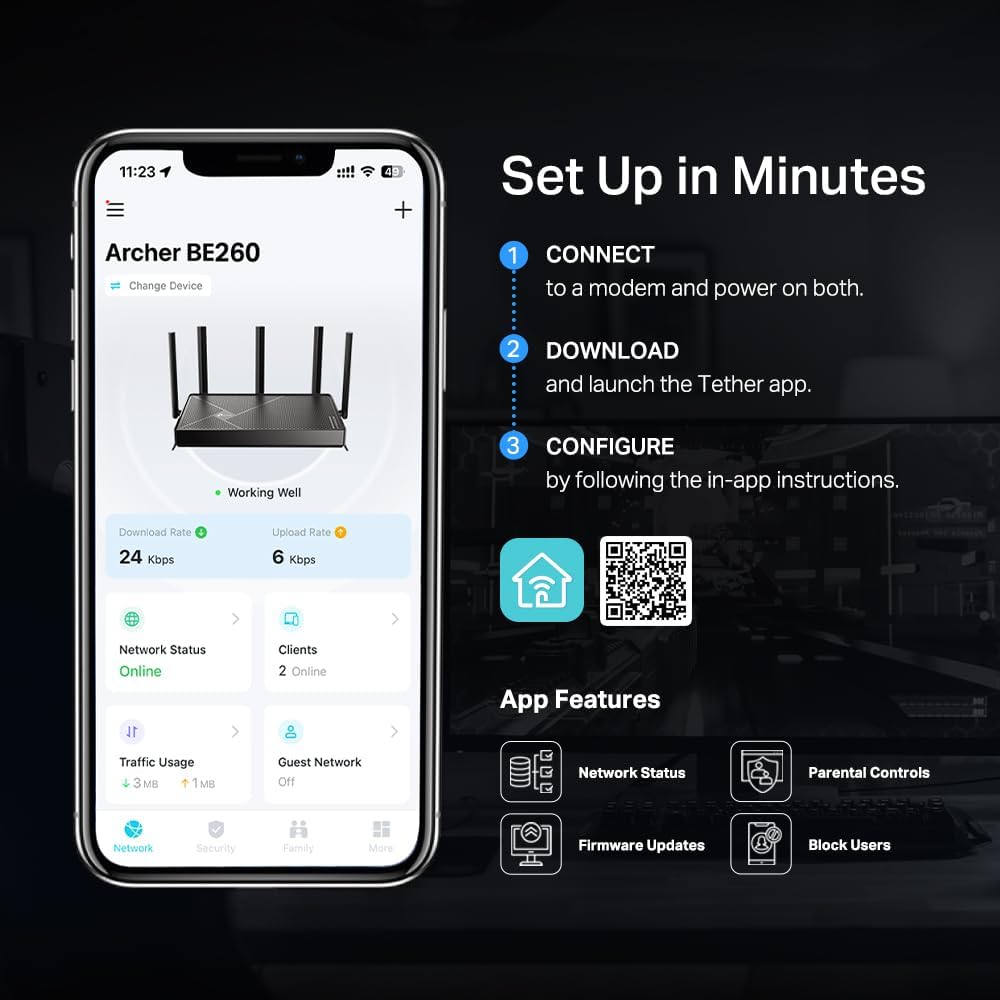
The Tether app offers intuitive network management, allowing you to monitor network status, block unauthorized users, and access TP-Link HomeShield. HomeShield has advanced security features that protect your family and network’s privacy and data. Features include a real-time home network scanner that detects potential threats and security issues, parental controls where you can manage time online and block inappropriate content, and quality of service (QoS) where you can assign your favorite devices to have the fastest connections for top performance. It also allows you to set up a separate Wi-Fi SSID for IoT devices and enable advanced WPA3 encryption, reducing the risk of unauthorized access to sensitive data on your main network.◇⌂
𝐍𝐞𝐱𝐭-𝐆𝐞𝐧 𝐁𝐄𝟓𝟎𝟎𝟎 𝐃𝐮𝐚𝐥-𝐁𝐚𝐧𝐝 𝐖𝐢-𝐅𝐢 𝟕 – Designed with the latest Wi-Fi 7 technology, featuring Multi-Link Operation (MLO), Multi-RUs, and 4K-QAM. With speeds up to 4324 Mbps on the 5GHz band and 688 Mbps on the 2.4 GHz band with 5 streams, the Archer BE260 delivers seamless 4K/8K streaming, AR/VR gaming, and incredibly fast downloads/uploads for optimized performance on latest WiFi 7 laptops and devices, like the iPhone 16 Pro, and Samsung Galaxy S24 Ultra. ⌂◇
𝐔𝐥𝐭𝐫𝐚-𝐅𝐚𝐬𝐭 𝟐.𝟓 𝐆𝐛𝐩𝐬 𝐖𝐢𝐫𝐞𝐝 𝐏𝐞𝐫𝐟𝐨𝐫𝐦𝐚𝐧𝐜𝐞 – Features 1x 2.5 Gbps WAN port, 1x 2.5 Gbps LAN port and 3x 1 Gbps LAN ports, integrate with a multi-gig modem for fast gig+ internet and offer high-speed data transmissions.
𝐖𝐢𝐝𝐞 𝐂𝐨𝐯𝐞𝐫𝐚𝐠𝐞 𝐰𝐢𝐭𝐡 𝐒𝐭𝐫𝐨𝐧𝐠 𝐂𝐨𝐧𝐧𝐞𝐜𝐭𝐢𝐨𝐧 – Get up to 2,400 sq. ft max coverage for up to 80 devices at a time. 5 optimally positioned antennas and Beamforming technology focus Wi-Fi signals toward hard-to-cover areas for stronger coverage.
𝐎𝐮𝐫 𝐂𝐲𝐛𝐞𝐫𝐬𝐞𝐜𝐮𝐫𝐢𝐭𝐲 𝐂𝐨𝐦𝐦𝐢𝐭𝐦𝐞𝐧𝐭 – TP-Link is a signatory of the U.S. Cybersecurity and Infrastructure Security Agency’s (CISA) Secure-by-Design pledge. This device is designed, built, and maintained, with advanced security as a core requirement.
𝐃𝐨𝐞𝐬 𝐍𝐨𝐭 𝐒𝐮𝐩𝐩𝐨𝐫𝐭 𝟔 𝐆𝐇𝐳 𝐁𝐚𝐧𝐝 – Please note that this dual-band WiFi 7 router does not support the 6 GHz band. It operates on the 2.4 GHz and 5 GHz bands only.
𝐄𝐱𝐭𝐞𝐧𝐝 𝐘𝐨𝐮𝐫 𝐂𝐨𝐯𝐞𝐫𝐚𝐠𝐞 𝐰𝐢𝐭𝐡 𝐄𝐚𝐬𝐲𝐦𝐞𝐬𝐡 – Easily extend your WiFi coverage by adding EasyMesh-compatible routers, range extenders and wireless powerline adapters, creating a seamless, whole-home network without dead zones as well as preventing drops and lag when moving between signals. △
𝐄𝐚𝐬𝐲 𝐒𝐞𝐭𝐮𝐩 𝐚𝐧𝐝 𝐔𝐬𝐞 – Set up your Archer BE260 in minutes and manage network settings with the Tether app (Android or iOS) or web interface.
𝐓𝐏-𝐋𝐢𝐧𝐤 𝐇𝐨𝐦𝐞𝐒𝐡𝐢𝐞𝐥𝐝 – Provides comprehensive home network protection, robust parental controls, and real-time IoT security when you are at home or on the go. A safer internet experience enhances your smart living and adds armor to your network.*
𝐕𝐏𝐍 𝐂𝐥𝐢𝐞𝐧𝐭𝐬 𝐚𝐧𝐝 𝐒𝐞𝐫𝐯𝐞𝐫 𝐒𝐮𝐩𝐩𝐨𝐫𝐭𝐞𝐝 – Enables home devices to access remote VPN servers without installing VPN software on each device. Supports simultaneous VPN and regular internet connections for enhanced security and flexibility.
𝐄𝐱𝐭𝐞𝐧𝐬𝐢𝐯𝐞 𝐂𝐨𝐦𝐩𝐚𝐭𝐢𝐛𝐢𝐥𝐢𝐭𝐲 – Use an Amazon Alexa or Google Assistant-enabled device to control Archer BE260 with just your voice. Backward compatible with all WiFi generations and works with any internet service provider (a modem is required for most internet service providers).
 Overview
David –
Good Value for Wifi7 (sortof)
Wifi 7 sortof… not a 3 band but 2 band router. It is very fast compared to the AX1800 I replaced. My last 3 setups have been TP Link products and always have had good value/performance with them. The only disappointment is to use the upgraded security features requires a subscription now. I won’t be doing that as I am using basic router security and always on a VPN whether home or away. This is a very good value if you want to insure being up to standard protocol for some time to come. My home is a ranch 1800′ and the reach upstairs and downstairs is strong. The router has performed flawlessly since being installed.
Rico –
Solid Wifi7 router at a very reasonable price
I had to buy a router because our current router was not performing well anymore. This one was Wifi7 yet was priced very reasonably. We needed it for a small apartment and we did not need a ton of functionality. The router was packaged very well and set-up was straightforward. I am pleased with this purchase. Highly recommended.
Tom –
So easy to set up replace my old equipment with, excellent coverage and performance.
I received the TP-Link Dual-Band BE3600 Wi-Fi 7 Router Archer BE230 | 4-Stream | 2×2.5G + 3×1G Ports, USB 3.0, 2.0 GHz Quad Core, 4 Antennas | VPN, EasyMesh, HomeShield, MLO, Private IOT | Free Expert Support.I’m using this as an access point only to provide wifi for my cable modem. The cable modem is doing the router bit. So far, I’m impressed. It was plug easy to set up – just had to change one setting in the tplink admin pages to get it out of router mode and into access point mode. Then I named my wifi SSIDs the same as my old access point, plugged it into the cable modem and I was off and running.Took the time to go through the settings and pick my 2.5/5 ghz channels (I live in a condo, used a tool to see what my neighbors were using for channels and picked an open one). It made it big difference.I got this to replace an older Archer model I got eight years ago. It has made a huge difference in my coverage and especially speeds.At under $100 when I got it, this is a great value for me. Satisfied with the performance and simplicity.
A-Dog –
Works well but changing networks is problematic
As a router this thing works great. The specs are great, it works well, it hosted 9 clients at an Airbnb. I’m already used to the TP-Link family of devices as I own a Deco mesh system and several TP-Link smart plugs. But there is something wrong when it comes to using this thing as an actual “portable travel router” which is what it’s says in the description.The idea behind a “portable travel router” is that you should be able to take it with you to new places (hotel rooms, coffee shops, libraries, etc.) and use it there. But they don’t make it easy to change the public network that the router is connected to. You’re supposed to be able to do that within the Tether app, but when I tried to change networks I went through every screen in that app, and I’m pretty sure the screen that it’s supposed to be is the one called “WiFi Settings” which was just showing an endlessly blank loading screen. What I had to do instead was visit the webpage of the router (tplinkwifi.net) and connect to it that way, and then there was a not-very-user-friendly settings page in which I could update the public host that the router connects to. Then you wait for it to reboot, and then it’s now connected to the new network. This is just not what I expected from something called “portable travel router”. It seems like a lot of people just set it up once at their home or office and leave it, but it needs to be easier to change networks for the people that use it as an actual travel router.Other than that, it’s great. Maybe a software update for the Tether app will make that easier in the future.
Jennifer –
Great for Spectrum 200mbps plan!
Update: It is now April 21, 2020 and we’ve been using the router for 2 months. It is still working perfectly for us and we have zero complaints. I highly recommend it!We moved to the middle of nowhere about 7 years ago and it never occurred to us to check who provided TV/internet/phone at the new house before buying. We found out after buying the house that the only providers were satellite companies. We realized very quickly that first year that satellite sucks, the internet specifically. We got locked into a $75 a month plan with HughesNet for a year and never once were able to actually use the internet that whole year. It was really frustrating. We simply did not have home internet for the past 6 years due to a lack of a decent provider. This past week Spectrum finally moved their service to our road. We immediately signed up. I knew I wasn’t paying them $5 a month to rent a router from them but I also wasn’t sure at all how to pick out a router myself. I’ve always been pretty tech savvy but when you lose access(and a need) to those things you stop keeping up with them, I was seriously behind on all the new updates that have been made over the last several years. I knew I didn’t want to spend more than $50 on a router and after doing some research I finally decided on this TP-Link AC1200 and basically just hoped for the best. Some of the reviews weren’t great so I was nervous. It arrived a day after our internet was installed so I set it up by myself. It took me all of 20 mins from unboxing to the whole house having Wi-Fi, it was VERY easy. I love that it has it’s own app, a very convenient feature. We live in a 2000sq. ft., one floor, manufactured home. These homes have pretty thin walls so the signal reaches from one end to the other very easily. We are also extremely heavy on our data usage in this family and while it’s only been a couple of days now it has had zero trouble keeping up with us. We’ve had zero buffering while streaming & using our phones, everything has been working very quickly. We have several smart TVs, cell phones, a laptop, a printer & a PS4 connected to it at the moment. The technician from Spectrum who installed our internet also said this was a good option for our 200mbps plan. I hope this helps someone make up their mind on whether this router will be a good choice for them. I will update the review if anything changes but as of now this seems to have been a pretty solid purchase and I’m happy with it.
MicGov –
I switched over to a new router as my old one was overheating and not reaching my full speed through the ISP. this router allows everyone in the house to connect their devices and it doesn’t slow down at all. A good buy.
Mohammed H. T. –
Very good no issues so far
Michel –
This works as advertised. Just reading other reviews, it seems they do not understand how it works. I can confirm gigabit Ethernet, tested and achieved 1.0 gbit/ second transferring data locally. The WiFi strength is what id expect from a 70$ router, and it can deliver my Internets top speed to any of my devices in the home. Good replacement for my old router.
Reynante –
good
Cornelis v. –
Funciona muy bien sin problemas de conexión.