Elevate your desktop experience with this budget-friendly GPU, delivering reliable performance for everyday computing and multimedia tasks. Its 4GB DDR3 memory provides sufficient bandwidth for smooth HD visuals and multitasking, offering a 20%+ performance uplift over older DDR1/2 solutions while maintaining cost efficiency.
Key Advantages:
Enhanced Entry-Level Gaming: Handles casual titles at 1080p with stable frame rates, ideal for MOBAs and older AAA games
Multi-Display Flexibility: Supports tri monitors via HDMI, DVI, and VGA ports for expanded workspace or immersive setups
Energy-Efficient Design: Low 65W TDP requires no external power connectors, compatible with most OEM systems like Dell Inspiron
Optimized Architecture: Features 384 CUDA cores and PCIe 3.0 interface for accelerated photo/video editing workflows
Ideal for upgrading office PCs or home entertainment systems, this card balances affordability with capable 1080p output. Its plug-and-play installation simplifies setup – simply replace your existing GPU via standard PCIe slot.
NVIDIA GeForce GT 740 4GB DDR3 128Bit PCI Express 3.0 Low Profile Video Card with HDMI / VGA / DVI Port for Office/Home Entertainment/Light Games
Enjoy all your videos and pictures at HD resolutions, speed up your PC experience
With 4096MB of memory capacity, this graphics card can meet the demands of home entertainment, light gaming, and office tasks.
Offers DVI, VGA and HDMI interfaces, making the video card easy to connect different types of displays. The DVI interface is suitable for digital signals, while the VGA interface is suitable for analog signals, and the HDMI interface supports high-definition video transmission.
Features a half-height low-profile design that making it compatible with various computer cases, especially SFF tower match with the included brackets.
What You Will Get: Glorto GeForce GT 740 4GB DDR3 Graphics Card x1 Low Profile Brackets x2
Perfectly Compatible with All Kinds of Windows Systems include Win11
Speed up your PC experience when you upgrade from integrated graphics to the new NVIDIA GeForce GT 740 dedicated card. Enjoy all your videos and pictures at HD resolutions, with 8X faster video editing, 9X faster photo editing, and 5X faster web browsing compared to integrated graphics. Discover 3X faster gaming performance than integrated graphics, making all your gameplay richer and smoother. You can even get the latest drivers and optimize game settings with a single click using GeForce Experience. The GeForce GT 740 is everything you need for a better, faster PC experience.
What Glorto GeForce GT 730 Can Do:
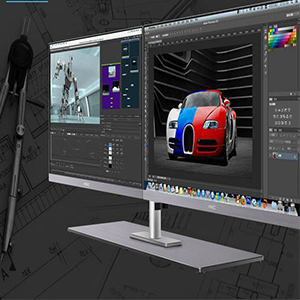
Dual/Tri Screen Display
Picture&Video Editing
Office Working
Specification
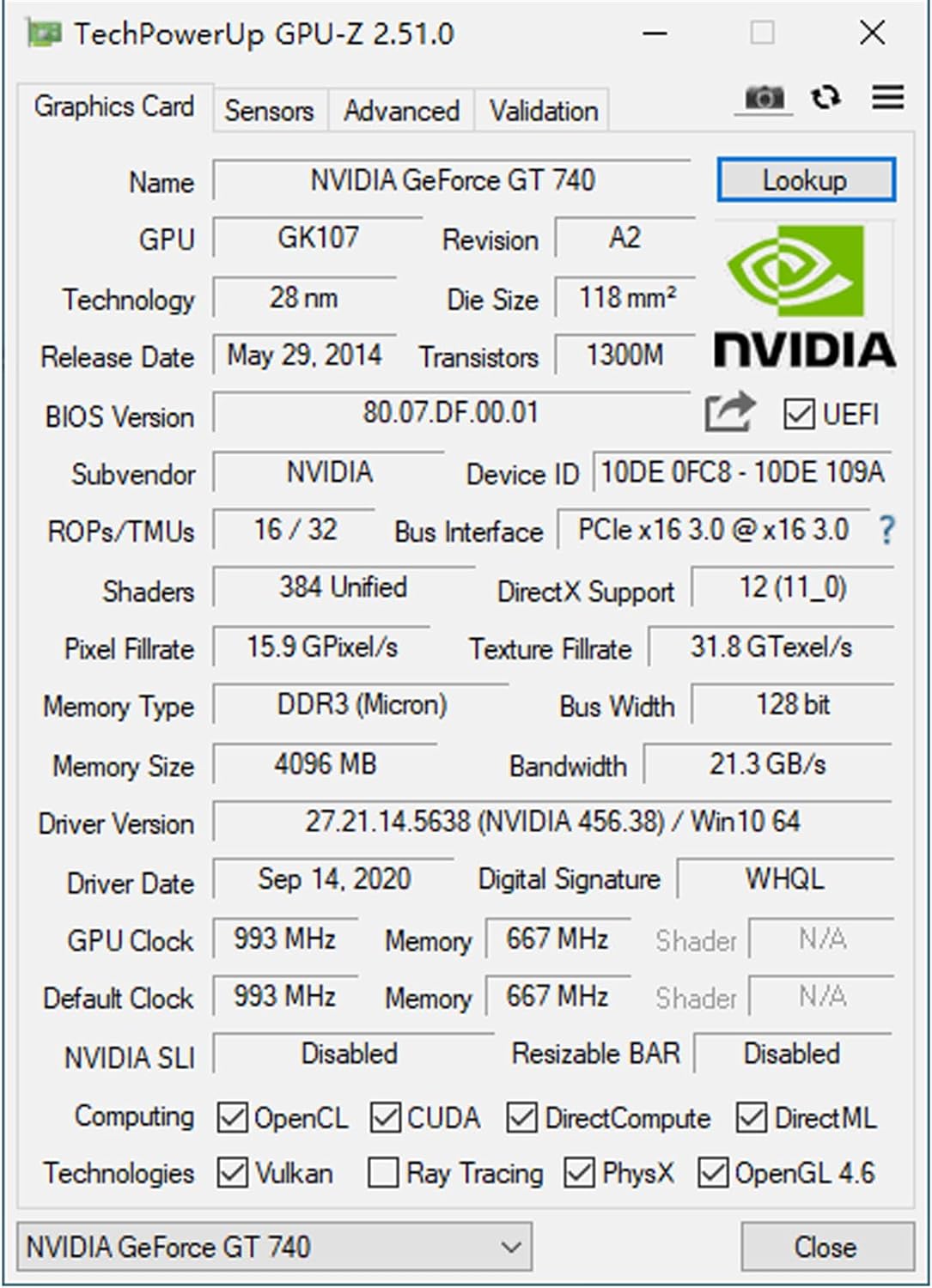
GPU Name GK107 Memory Format 4GB DDR3 128 bits Ports HDMI / DVI / VGA CUDA Core 384 GPU Clock 993 MHz Memory Clock 667 MHz Size 160*120*20mm Slot PCI Express x16 3.0 DirectX Support DirectX 12(11_0) Maximum Digital Resolution 2560×1600 Computing OpenCL / CUDA / DirectCompute / DirectML Technologies OpenGL 4.6 / Vulkan / PhysX
Troubleshooting Tips
The following troubleshooting tips may help if you experience problems. Contact GLORTO for more advanced troubleshooting information.
Check that the card is seated properly in the PCI Express slot.Ensure that the display cable is securely fastened to the card’s display connector.Make sure that the monitor and computer are plugged in and receiving power.If necessary, disable any built-in graphics capabilities on your motherboard. For more information, consult your computer’s manual or manufacturer. (NOTE: Some manufacturers do not allow the built-in graphics to be disabled or to become the secondary display.)Make sure you selected the appropriate display device and graphics card when you install the graphics driver.Restart your computer. Press on your keyboard after system starts up. When the Windows Advanced Options Menu appears, select Safe Mode and press . After getting into Safe Mode, in Device Manager check whether the driver for the graphics card is correct.If you are not able to find the desired monitor color/resolution settings: The color and screen resolution options available for selection depend on the graphics card being installed. If necessary, adjust your monitor’s setting using monitor’s adjust panel to make the screen look focused, crisp, and sharp. (Please refer to the monitor’s manual.)
Powered by NVIDIA GeForce GT 740, 28nm chipset process with 993MHz core frequency, integrated with 4096MB DDR3 memory and 128-bit bus width More stable performance, compatible with Win11, can automatically install new driver HDMI / VGA / DVI 3 ports output available. HDMI Max Resolution-2560×1600, VGA Max Resolution-2048×1536, DVI Max Resolution-2560×1600 Support DirectX 12, OpenCL, CUDA, DirectCompute, DirectML, Vulkan, PhysX, OpenGL 4.6 Original half height bracket matches with the low profile brackets make the Glorto GeForce GT 740 graphics card fit well with all PC tower, small form factor and HTPC(except micro form factor)
Specification
Overview
Customer Reviews
Rated 0 out of 5
8 reviews
Rated 5 out of 5
0
Rated 4 out of 5
0
Rated 3 out of 5
0
Rated 2 out of 5
0
Rated 1 out of 5
0
8 reviews for GeForce GT 740 4G DDR3 Low Profile Graphics Card, PCI Express 3.0 x16, HDMI/VGA/DVI, Entry Level GPU for PC, SFF and HTPC, Compatible with Win11
Great video card for the Price
The most challenging thing about this video card is finding the software for this hardware. After I did though, everything worked just fine. I had bought a similar video card for my desktop but it wouldn’t work with certain programs and although the box said new, it would not update to today’s standards, so it had to go. This card performs all the functions that I need for gaming and for my 3D digital art. It is a good option if you are on a budget like myself
older graphics card
it’s outdated by today’s standards, however its good for out of date desktops or older monitors fairly good for gaming, but overall its outdated even by Intel HD Graphics 530 standards
Good Replacement for an Older System
My computer is a little older, around 10 years old and was having some problems. I reset the computer and windows. That really helped, but it also meant I lost the driver for my older AMD HD 5770 graphics card. As the card is no longer supported, the drivers are no longer downloadable. I started looking for a replacement graphics card. Considering my system is a bit older and requires PCIe 2.0 compatibility, I decided to get the Glorto GeForce GT 730 4G GDDR5. This is the same card as the NVIDIA GeForce GT 730 4G GDDR5. While not rated the best, it suited my purposes as I didn’t want to invest a large amount in a card that wouldn’t work in my system. I received the graphics card just a couple of days after ordering it. Installation was very easy. The card is powered from the motherboard versus having a power adapter like my old AMD card had. After installation, I started the computer up and the card was instantly recognized. After a couple of minutes, Microsoft Store had automatically downloaded the NVIDIA Control Panel. After making the adjustments I wanted for the graphic card, I started a computer game that has quite a bit of graphics, loaded and played a YouTube video and started writing this review all at the same time. The graphics card had no problem keeping up with all of this. My one concern for the graphics card is NVIDIA says it is no longer supported; however, the seller provides a link for NVIDIA support that has the most recent security updates and any driver updates for this supposedly unsupported card.Video Setting Capabilities:4GB MemoryUltra HD, HD, and SD Range: 720 x 480 up to 1920 x 1080PC Range: 800 x 600 up to 1680 x 1050Refresh Rate: 50Hz, 59Hz and 60Hz
Excellent for OptiPlex SFF System.
Easy to setup. Simple install. Automatically loaded drivers after a few minutes. This a in a Dell OptiPlex 3050. Improvement in graphics and overall speed. Oh, be sure to disable original embedded Intel GPU. I can hear a slight amount of fan noise. This works well in the framework of this business desktop system.
Some work required!
This came all wrapped-up in ESD bags so I didn’t really look at it until it came out of the protective wrapping. Once I found out how to open the case and the graphics card slot I discovered the “Low-Profile” is only if you want it that way. There are 2 mounting plates in the box that are for the low profile version and it’s up to you to disassemble the card and put it back together with the 2 plates installed (side-by-side) not the vertical version that won’t fit inside this case. When I finally got all the bugs out with the cables fitting correctly and the monitor message NO SIGNAL finally gone, this graphics card produces a beautiful clear image. But when it says Low-Profile on the box that’s what I expect it to be.
Don’t waste your time…or your money.
This video card is a real piece of junk. When I received it, it was supposed to come with a full size insert for full size PCI slot plate and two smaller ones for compact PC’s. There was only the two small ones and one of the plates was bent. I really think this was a previously returned video card! I ended up sending it back.






 Overview

Johnny Z –
Good value for the money
Great upgrade,helps with games
Ranzzlee –
Great video card for the Price
The most challenging thing about this video card is finding the software for this hardware. After I did though, everything worked just fine. I had bought a similar video card for my desktop but it wouldn’t work with certain programs and although the box said new, it would not update to today’s standards, so it had to go. This card performs all the functions that I need for gaming and for my 3D digital art. It is a good option if you are on a budget like myself
Wayne –
Great card
Great graphics card gives my pc quicker response. Plug and play.
Brandon –
older graphics card
it’s outdated by today’s standards, however its good for out of date desktops or older monitors fairly good for gaming, but overall its outdated even by Intel HD Graphics 530 standards
DJD –
Good Replacement for an Older System
My computer is a little older, around 10 years old and was having some problems. I reset the computer and windows. That really helped, but it also meant I lost the driver for my older AMD HD 5770 graphics card. As the card is no longer supported, the drivers are no longer downloadable. I started looking for a replacement graphics card. Considering my system is a bit older and requires PCIe 2.0 compatibility, I decided to get the Glorto GeForce GT 730 4G GDDR5. This is the same card as the NVIDIA GeForce GT 730 4G GDDR5. While not rated the best, it suited my purposes as I didn’t want to invest a large amount in a card that wouldn’t work in my system. I received the graphics card just a couple of days after ordering it. Installation was very easy. The card is powered from the motherboard versus having a power adapter like my old AMD card had. After installation, I started the computer up and the card was instantly recognized. After a couple of minutes, Microsoft Store had automatically downloaded the NVIDIA Control Panel. After making the adjustments I wanted for the graphic card, I started a computer game that has quite a bit of graphics, loaded and played a YouTube video and started writing this review all at the same time. The graphics card had no problem keeping up with all of this. My one concern for the graphics card is NVIDIA says it is no longer supported; however, the seller provides a link for NVIDIA support that has the most recent security updates and any driver updates for this supposedly unsupported card.Video Setting Capabilities:4GB MemoryUltra HD, HD, and SD Range: 720 x 480 up to 1920 x 1080PC Range: 800 x 600 up to 1680 x 1050Refresh Rate: 50Hz, 59Hz and 60Hz
Paul –
Excellent for OptiPlex SFF System.
Easy to setup. Simple install. Automatically loaded drivers after a few minutes. This a in a Dell OptiPlex 3050. Improvement in graphics and overall speed. Oh, be sure to disable original embedded Intel GPU. I can hear a slight amount of fan noise. This works well in the framework of this business desktop system.
glenn –
Some work required!
This came all wrapped-up in ESD bags so I didn’t really look at it until it came out of the protective wrapping. Once I found out how to open the case and the graphics card slot I discovered the “Low-Profile” is only if you want it that way. There are 2 mounting plates in the box that are for the low profile version and it’s up to you to disassemble the card and put it back together with the 2 plates installed (side-by-side) not the vertical version that won’t fit inside this case. When I finally got all the bugs out with the cables fitting correctly and the monitor message NO SIGNAL finally gone, this graphics card produces a beautiful clear image. But when it says Low-Profile on the box that’s what I expect it to be.
Ed Gould –
Don’t waste your time…or your money.
This video card is a real piece of junk. When I received it, it was supposed to come with a full size insert for full size PCI slot plate and two smaller ones for compact PC’s. There was only the two small ones and one of the plates was bent. I really think this was a previously returned video card! I ended up sending it back.