
-85%
Sale!


Product description

 Minimum trigger duration: 5 seconds
The security camera with PIR Human Detection can recognize human precisely, minimizing false alarms.


You can adjust the video resolution based on your network conditions.


1 PIR Human Detection
2 Color Night Vision
3 2K Crystal Image
4 2-Way Audio
5 Motion Detection & Siren
 Reduce False Alarms
Customize the sensitivity level and retrigger interval to reduce false alarms and save battery power.
 Privacy Mode
Temporarily turn off the outdoor camera wireless as needed.
 Easy Installation
Please charge the camera for 5-6 hrs before installation.
Then install it in direct sunlight without obstructions. To save battery, limit detection time/zone in the app if frequent alerts occur.
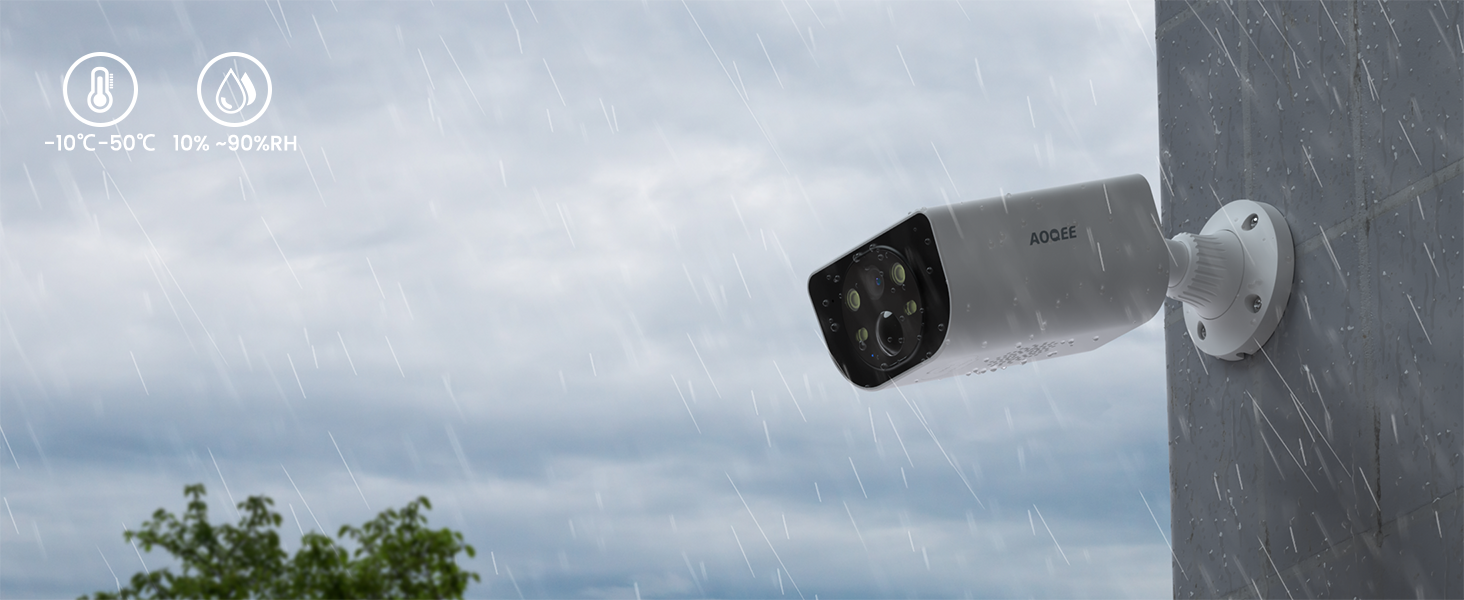 Waterproof
The cameras for home security with IP65 rating work reliably in harsh weather (rain/snow), but avoid submersion in water.

The camera’s built-in alert function meets daily needs. Cloud storage subscription is optional and non-compulsory.
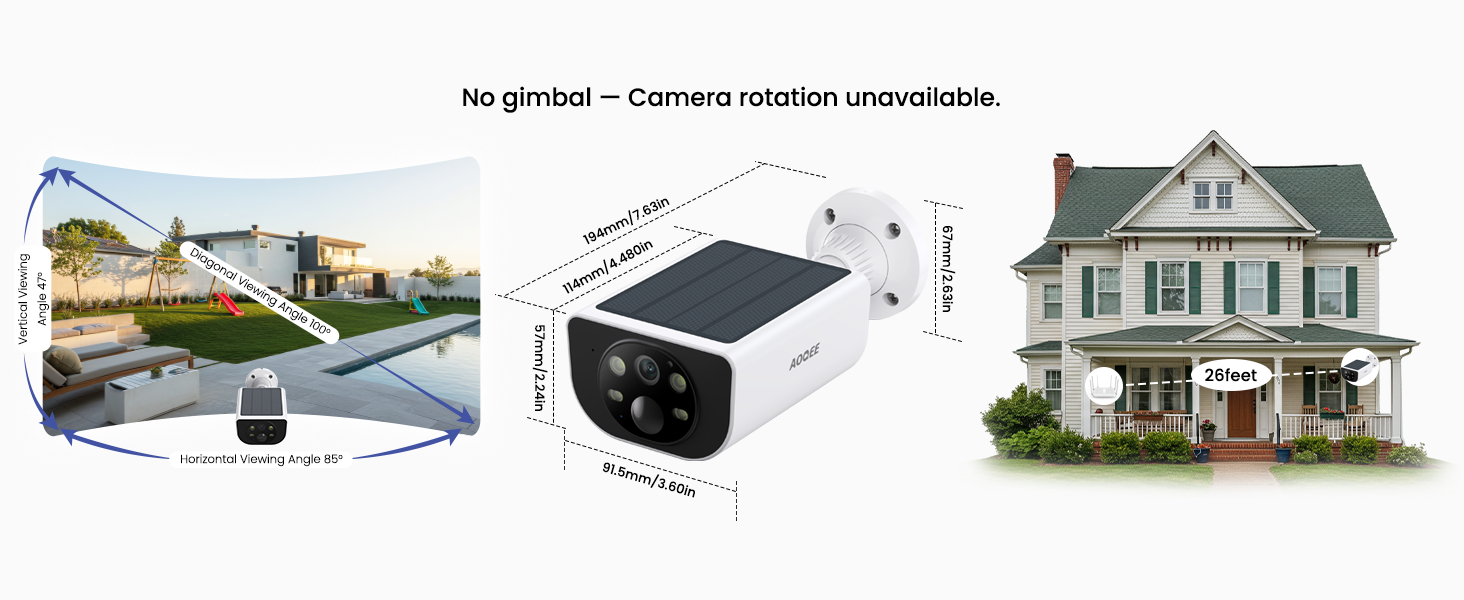
With its monolithic, one-piece construction, this camera is designed for easy installation and is roughly the size of a man’s palm.
 Works with Alexa
Connect your security cameras wireless outdoor to the Alexa device, then their assistants will display cameras for home security live feed with your voice commands. Note: the wireless camera is not allowed to be viewed on their APPs.
 Sharing with Multiple Users
The outdoor camera make it more convenient for you to share your wireless security camera outdoor with your family members or friends from everywhere at any time, so they can view the solar camera outdoor wireless with you simultaneously.
Customer Reviews
4.0 out of 5 stars 4,717
4.6 out of 5 stars 147
4.0 out of 5 stars 4,717
4.2 out of 5 stars 4,652
4.2 out of 5 stars 4,652
Price
$79.99$79.99
$49.99$49.99
$39.99$39.99
$25.99$25.99
$16.14$16.14
WiFi Connection
2.4Ghz WiFi Only
2.4Ghz WiFi Only
2.4Ghz WiFi Only
2.4Ghz WiFi Only
2.4Ghz WiFi Only
Resolution
2K
2K
2K
2K
2K
Battery Equipped
✔
✔
✔
✘
✘
Cordless
✔
✔
✔
✘
✘
PIR Detection
✔
✔
✔
✘
✘
Human Detection
✔
✔
✔
✔
✔
Weather Resistance
✔
✔
✔
✔
✔
Colour Night Vision
✔
✔
✔
✔
✔
2-Way Audio
✔
✔
✔
✔
✔
Does this wireless camera support 5G Wi-Fi?
No, it doesn’t support 5G Wi-Fi, it can only connect to 2.4Ghz Wi-Fi.
If you use EERO, you need to disable [advanced settings] and 5G for a while to get tghe 2.4G devices connected. Once done, you can reenable the settings.
Does the outdoor camera wireless S1 support 24/7 continuous recording?
No, it doesn’t support 24/7 continuous recording as it is a low-power camera with requiring power-saving for a balance battery-powered working status. But it can detect and record motion via PIR, generating motion alerts and save them in the app.
Does the outdoor security camera support SD card or cloud storage?
Yes. But if no sd card or subscription,pls check the clips in ALERT, page, if you go REPLAY, it will show on subscription details for your reference, which can be safely ignored. You can obsolutely use the camera with no any subscription or sd card.
Why is my security camera recording slowly and occasionally not uploading footage?
Unstable network may affect the video transmission. Better position the camera within 26 feet of your router. Avoid connecting too many devices to the same network. If you encounter issues, try refreshing the app by pulling down on the screen.
What should I do if the camera won’t hold a charge or the battery drains quickly?
You can customize the sensitivity level to reduce false alarms, and toggle the power saving mode to conserve battery power. We recommend placing the camera in direct sunlight with enough solar power to ensure the camera stays charged.
Wireless Solar Charging & Easy installation: Built-in solar panel, security cameras wireless outdoor allow you to truly get rid of tangled wires, just place the outdoor camera under the solar energy to charge, realizing 365 days of solar energy use continuously. Simply press the power button and follow the in-app instructions to connect the security camera to your 2.4GHz Wi-Fi easily. Not support 5GHz WiFi
Crystal 2K Image & Color Night Vision: Compared with 1080P image, the wireless camera outdoor provides you with a sharper image at 2K Resolution, which reproduces the lifelike images, allowing you to view every detail of your outdoor area and prevent threats or intruders. During the nighttime, the security camera outdoor spotlight turns on automatically, offering you clear images even in pitch black. Only work with 2.4Ghz WiFi
AI Human Detection Siren & Intelligent Spotlight: The wireless security camera outdoor with PIR motion sensor and automatic spotlight provide you and your family a full-protection on your safety and property. When the wireless camera outdoor detects unexpected visitors approaching your house, it will trigger an audible alarm and automatically turn on the night spotlight to scare the intruders and send you instant notifications, so you can maintain a peace of mind even when you’re not at home
SD card (not included) and cloud storage (optional): The outdoor security camera supports motion-activated recording via micro SD card (up to 128GB) and cloud storage services. While it doesn’t support continuous 24/7 recording, it can capture extended 60-second video clips when using an SD card. Additionally, the built-in alert function provides 10-second short clips to meet your basic monitoring needs.
Two-Way Audio & Muti-User Sharing & All weather protected: The outdoor cameras for home security with microphone and speaker to ensure clear and real-time remote calls to your family or friends, and even warn off intruders at the door. You can share your camera remotely with your family from anywhere, and they can also access to the solar security cameras with you simultaneously. It is waterproof to withstand any bad weather
 Overview

Legacy Mark –
Very good solar cameras for the price!
I wanted to enhance my outdoor security with additional solar cams, as my old one stopped working. I do not live in a bad neighborhood but always looking for an excuse to buy more security cams. I favor the medium priced cams and feel they work as long or longer than some higher priced cameras (such as Nest). I came across these S1 4P AOQEE solar cameras, liked the positive reviews, and thought I’d give them a shot.My wifi is strong, and my always rule on security cams is there can’t be any wifi connectivity issues (nor any issues staying connected). I have numerous other cams outside with no wifi issues, so if a new cam purchased has connectivity issues, I know it’s the cam, and not the wifi. In any event, I’ve had these cams up and running outside for two weeks now, and I’ve not lost the internet even once. That’s good news.Setup and installation were simple. Average time to get the cams connected and up and running was about three minutes total. During a very simple setup, I used their QR code on my phone and the cams pared with the app in less than 15 seconds each. It uses the Wansview app and I use this app for a few other cams and never had problems with it.I need solar cams as certain areas on my property do not have electrical outlets available. After two weeks, the battery on each is always around 98-100%. Even with cloudy days. These S1 solar cams are my first with built-in panels, instead of a separate solar panel with connection cord, but I see no issues. Love that I don’t have to remove them to charge to my PC. Also, the supplied mounts are easily adjustable so setting up with the angle needed for best sun exposure is no problem. Regarding video quality, the images are quite clear in daytime, and night vision is impressive. Good stuff. The motion detection feature is pretty good, as notifications to my phone are sent within seconds, and it’s quite accurate with no false alerts for the most part.As mentioned, I feel cameras such as these give more value to the buck than some higher priced models that do the same things. For the money spent, I am quite satisfied with these S1 Aoqee security cameras.
PureMomentum –
The Most Versatile Wireless Solar Outdoor Security Camera
One of the most simple yet versatile outdoor cameras I have ever owned. I love it’s all-in-one design with the solar panel built in. This it makes it very portable and perfect for changing applications.My wife’s garden often has critters visiting in the night and robbing her produce, so we simply placed the S1 camara on the porch rail facing the garden to capture images of the critters so we’d know what we were dealing with. It not only caught the deer on camera, but scared them off when the built in security light came on, it startled him and he ran off. So we keep one of the S1 cameras on the garden as a deterrent. Similarly, I have used this to monitor the grill overnight.My parents use the S1 camera in the same manner to catch humming birds feeding on their back porch. They keep it on the porch ledge and change the direction depending on which bird feeder is more active.Last thing I’d like to mention is the Wansview Cloud app used to monitor the cameras. It works with the whole family of Wansview products, so all my cameras are in one convenient place. This makes it easy to use different cameras without a long learning curve when having to use different apps. It’s simple, learn it once and apply it to all of your devices.
Troy –
Clear picture and easy to setup and use.
I purchased the four pack S1 camerasThere are instructions on how to set up the camera on your network included.I selected the camera type in the Wansview app for the battery S1.To set up the camera, I used the scan method to connect the camera to my network. It was easy. Just hold your smartphone up to the app and scan the QR code, then listen to the audio prompts from the camera as it tells you what’s going on, then continue to follow instructions in the app.I put my own 128 gig memory SD card into the camera(s).The phone app can review live video or stored video using your phone app as well ason the SD card. I recommend getting a SD card.Also, if you want to view the cameras live on your computer you can use the pc app, Amazon show, or Fire TV.You can easily integrate with Alexa to do this.I use my Alexa fire TV to view the cameras on my big TV at any time.I mounted my cameras using the hardware provided and even a template to mount the base of the camera. I made sure they are getting sunlight as they are solar-powered. I do not need to use the charging cords once they are mounted. My cameras charge up using the sun each day to 100%, as you can check battery status in the smartphone app.There are several really nice features. You can have the spotlight turn on when motion is detected at night. You have the ability to hear what’s going on as well as talk to whatever is near the camera. I like that you can go back and review what was recorded by date and time. You need to use the cloud service for the ability to save and recall the capture online. Or for free, put a sd card into each camera 128Gb max. You get notifications as well as 15 seconds of motion captured for free no matter what if you want even without the SD card.You can have the motion detection look for people as this will pick up a person and count that as motion however you can just report all motion detection and it will record this if you have a sd cord or the cloud service. You can adjust sensitivity of detection. I have several of the cameras and they all have very clear crisp pictures. The 2k video is very clear even at night. I love that you can adjust the camera to adapt at night to a color picture using the existing lights that are around your property, or the spot light built in, instead of seeing the picture in just in black and white. I bought the 4 pack and love them. I recommend these cameras as they use a battery and or USB C cable that comes with the cameras. They are solar so all you do is charge it once and solar does the rest with no cords at all. So far on cloudy days I have not seen any concern as the battery shows full all the time. The sensitivity can be adjusted as well as distance of detection. The Wi-Fi is 2.5 GHz only. The wansview app is very solid and has many features that also allow you to talk to the person if you want, as well as notify you of an alert. You can zoom in the picture to see closer and set the picture to full screen on your phone app. The echo show also lets you zoom in. The ability to set up each camera in about 5 minutes, a perfect picture, ability to see the cameras using the app on my pc to look at all the cameras at once is perfect. I recommend these cameras to anyone who wants security and just the ability to look at an area quickly when they get a notification.
Cliente Amazon –
La he comprado como cámara de seguridad durante las vacaciones y considero que lo que ofrece por su precio es inmejorable.La calidad de vídeo es decente, nose si 2k pero es bastante buena, incluso en el Night Visión.Te envía alertas en foto o Vídeo de 6s de forma GRATUITA. Sin enviarte publicidad cada dos por tres de que mejores el plan pagando, como hacen muchas otras. Luego si añades una SD puedes hacer grabaciones 24h.Al ser carga Solar, su conexión es al Wifi de casa y a correr. Su configuración es bastante sencilla, aunque hay que detenerse un rato a mirar donde se configura todo.Su Carga solar y el cómo mantiene la batería me ha sorprendido mucho para bien. Había leído comentarios de que no cargaba bien, que no aguantaba, pues la he probado en diferentes localizaciones, al sol directo, debajo de una pérgola de cristal y muro al lado, y en todo momento carga al 100%. Por lo que su carga y duración es excepcional.Tiene modo de tener 4 luces infrarrojas, para disuadir más y que se note que está grabando. Que se enciende el foco de luz ( bastante potente) o de hablar por medio del altavoz, incluso de hacer sonar una alarma.Su servicio postventa es cierto que es muy bueno, cualquier duda que les he enviado a las horas o al día siguiente ya he tenido respuesta rápida.Como única oportunidad detectada: es que su alcance del Wifi ( 2G) es limitada, si tienes el router algo lejos y te pilla paredes en medio o puertas, se limita bastante más. Yo la tengo a 8 metros aproximadamente, y tiene un muro interior y la fachada exterior y llega justo,Sin lugar a dudas, cogeré una cámara más, y la he recomendado a mis familiares.
Daoudi –
Parfait
Ana L. –
Es muy buena camara, se carga solo con el Sol, se escucha muy bien el sonido, la imagen es muy buena, envía alertas de movimiento, tiene sirena y puedes hablar y prender la luz, excelente compra!
Streetfarm –
What’s Included.• The camera itself• A wall-mount with 360 degree swivel bracket, a drilling template, and screws with wall fixings• USB3 charging cable• Certificate of Conformity• 24H Surveillance warning sticker• Quick Start GuideSetting upInstallation was the quickest I have experienced. I was pleased to see that this camera uses the WANSVIEW app, which I already had on my phone. Pressing the POWER button for 5 seconds followed by pressing the RESET button for 5 seconds resulted in the indicator light flashing alternately red and blue. These buttons are located beneath the flap on the top of the camera.After tapping the Add Device button on the app and pointing the camera at the QR code on the app, the camera announced by voice that it had successfully been added to my network.Immediately the image from the camera appeared in the app, together with my other Wansview cameras. Selecting the settings symbol resulted in a window informing me of the Wifi strength and battery charge.Next to the POWER and RESET buttons there is a USB3 slot marked DC 5V, and another marked TF. The DC 5V is for charging the internal battery should there not be sufficient sunlight to charge it during use. I did not need to charge the battery as the app informed me that it was already at near full charge.The TF (TransFlash) slot is for a memory storage card for local storage of images and video. Although it says TF, I managed to insert a 32GB micro SD card. The app detected my 32GB card then included a section for Memory Card Storage. There are a few options associated with this, like Motion alert ENABLE, when to record (scheduled or 24/7), space remaining, and action to take when storage is full (overwrite earliest recordings or stop recording). It also had options for custom recognition and notifications including person recognition.There is no need to subscribe to a cloud based subscription if using the memory card.InstallationThis involved mounting the camera at a suitable location. This would be a wall or any flat vertical surface where the view required is available. Note, however, that the location must have a good 2.4GHz WiFi signal.The mounting bracket is easy to fit. The template can be stuck to the surface and then the holes drilled where indicated. I found that it if the swivel mount is unscrewed form the mounting base, it was possible to hold the bracket against the mounting surface and then to drill using the holes in the base. The swivel mount has a threaded stud which screws into a socket on the back end of the camera, and the swivel bracket is held to the base by plastic collar. This should be loosely attached so that the body of the camera may be rotated and angled as required before tightening the collar.My attachment was to a wooden beam, so the supplied fixings were not required.In UseThe image on the app was bright and sharp and declares itself on the image to be 2K, which is similar to High Definition (HD) or 1920 x 1080 pixels. As I watched myself on the app walking towards the camera, there was very little delay and movement was smooth. The app allows the image to display individually with options in the main screen, individually at full screen or with other Wansview cloud cameras (if any) in a grid.The settings menu provides access to various other functions built in to the camera, but at the top of the main screen is a useful indication of WiFi signal strength and the battery charge percentage. If sunlight is detected, then the battery symbol alternates between blue and green to indicate that it is charging.On testing the alert function it appeared that an alert was not triggered unless the movement was close to the camera. Checking the Motion detection settings revealed that by default these have been set to Power-save mode (see screenshot above). Clearly, with a battery powered camera it is important that the battery drain does not exceed the solar charging capability. In a British winter, I’m not sure how this will work out even in Power-save Mode. The settings available are:POWER-SAVE STANDARD PERFORMANCESENSITIVITY LOW NORMAL HIGHDETECTION DISTANCE NEAR NORMAL FARRETRIGGER INTERVAL 60 SECS 30 SEC 0 SECSThe camera did trigger an alert and it did record me but not until I had reached the camera and started to walk away, but in the light of the above explanation I think this is acceptable. I changed them to Standard Mode, and this time an alert was triggered when I was about 5 metres away from the camera, so I think Performance mode would increase this distance further.The battery indicated that it was 60% full after running for 5 days in Power-Save mode in poor sunlight weather. After changing the settings to Standard, the battery indicated 48% after about 4 hours. However I was creating a lot of alerts in that time by walking back and forth to check it. With it still in Standard mode but with nothing to cause an alert, it is still showing 48% 2 hours later.Reviewing the alerts is achieved by selecting the Replay button on the main screen of the app. This will open a timeline showing where the alerts have occurred, and allow the video at that time to be viewed.Night vision is very good, with the built in infra-red lighting automatically switching on when darkness descends (see screenshot above).SummaryA very impressive camera – easy to set up and good quality images were obtained day and night. The alert function can be adjusted between power saving and sensitivity. The only minor issue I had was the camera slipped slightly during a high winds. Make sure the swivel bracket is fully tightened.Update after 2 months’ use (Mid December to Mid February 2025)The camera has performed faultlessly, providing clear images, day and night. Particularly impressive is the fact that its solar panel has now charged the battery to 100%, as indicated on the display. No charging cable has been attached during use. This is despite the fact that I have set it to Performance Mode, with the motion sensitivity at HIGH, detection distance to FAR and retrigger interval to 0 seconds.
Antonio Polidoro –
For the price , you can’t beat these cameras. Batteries charge up quick in the sun,and stay charged. Picture quality is pretty good,easy to set up,easy to use ,and it has many options to fine tune the surveillance. I have 2 set up, and are very happy with the purchase.May add a 3rd camera soon.