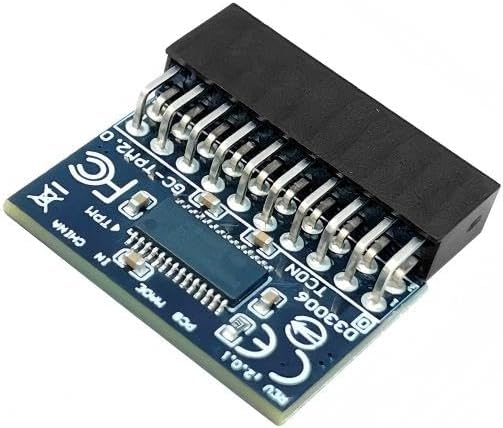
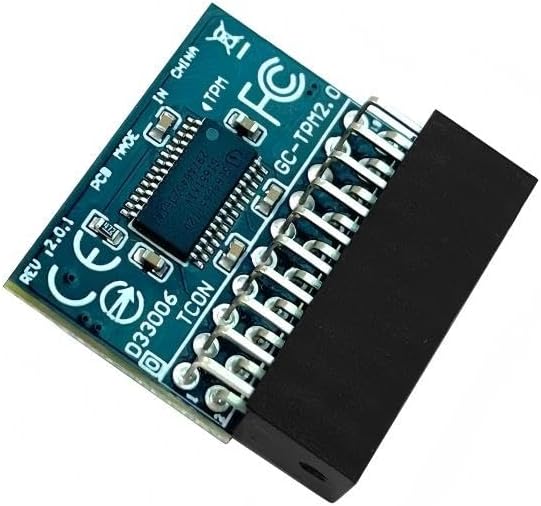
Interface LPC TPM IC Infineon SLB9665 TPM Version TPM 2.0 Pin Connector 20pin-1 Compatible For Gigabyte TPM-M R2.0 Product TPM2.0 Module LPC 20Pin-1 Module with Infineon SLB9665 for Gigabyte Motherboard Compatible with GC-TPM2.0
● Core Applications:
a: Seamless upgrade to Windows 11: Resolve TPM 2.0 verification issues and easily upgrade to the latest operating system.b: Enhanced hardware-level security: Provides an independent secure encryption chip specifically designed for securely storing sensitive data (such as encryption keys, digital certificates, and login credentials), thereby enhancing overall system security.
● Important Notes:
1. This product is only compatible with older motherboards such as Intel and AMD. It is not compatible with newer motherboard models featuring firmware TPM, all-in-one PCs, or laptops.2. The minimum hardware requirements for upgrading to Windows 11 via TPM 2.0 are as follows: a 1 GHz or faster 64-bit processor (dual-core/multi-core), 4 GB of memory, 64 GB of storage space, firmware supporting UEFI Secure Boot and TPM 2.0, a DirectX 12-compatible graphics card, and a display with a resolution of 720p or higher.3. This product has a 20pin-1 connector. Please carefully check the pin positions in the image to ensure compatibility with your motherboard before purchasing.
● How to select and install a security module:
Confirm whether the host has TPM 2.0 or if TPM 2.0 is enabled. Click Run, enter: tpm.msc (Win+R keys), and check if the TPM version is ready. If version 2.0 is displayed but not ready, you need to configure settings in the BIOS; consult the motherboard manufacturer’s custo mer ser vice.
4. Open the host and inspect the TPM pins on the motherboard. 5. When installing the module, ensure the chip-side faces inward, align with the pins, and insert fully to prevent loosening. (See image for direction)
TPM 2.0 (20pin-1) with Infineon SLB9665 Compatible with GA-AX370M-DS3H、GA-AX370-Gaming K3、GA-AX370-Gaming K5、GA-AX370-Gaming K7、GA-AX370-Gaming、GA-AX370-Gaming 5、GA-AB350M-HD3、GA-AB350M-DS2、GA-AB350M-D3H、GA-AB350M-Gaming 3、GA-AB350-Gaming Chipset:SLB9665 GC-TPM2.0 Compatible with GA-A320M-S2H V2、GA-A320M-D2P、GA-A320M-HD2、GA-A320-DS3、GA-A320M-S2H V2、GA-A320M-S2H、GA-A320M-DS2、GA-A320M-H Important note: This product is only compatible with older motherboards such as INTEL and AMD. It is not compatible with newer motherboard models featuring firmware TPM, all-in-one computers, or laptops. Important Notes: The minimum hardware requirements for upgrading to Windows 11 via TPM 2.0 are as follows: a 1 GHz or faster 64-bit processor (dual-core/multi-core), 4 GB of RAM, 64 GB of storage space, firmware supporting UEFI Secure Boot and TPM 2.0, a DirectX 12-compatible graphics card, and a display with a resolution of 720p or higher. Purpose a: Resolve the TPM 2.0 verification issue when upgrading to Windows 11, enabling it to function as an independent encryption chip, providing secure storage for sensitive data, and enhancing security; Purpose b: Hardware encryption acceleration, such as improving game lag issues and other functions. Hardware encryption acceleration: Reduces CPU load by accelerating encryption operations via dedicated hardware, indirectly improving system response speed and enhancing the smooth operation of certain encryption-dependent applications (such as games and security software).
Works to some degree with my Supermicro board
I got this device because I had a few older gigabyte motherboards and I thought I might need it for the Windows 11 upgrades; but I saw that it was the same pin out as the connector on my Supermicro H11DSi dual Epyc server board so I plugged it in and was surprised to see that Windows recognized it. I don’t know if it is completely working, because I used the ignore TPU option when installing windows 11; and I really don’t know how to test if it is fully functional. But it’s nice to know that this device might work on other motherboards.





 Overview

Dave Evers –
Works to some degree with my Supermicro board
I got this device because I had a few older gigabyte motherboards and I thought I might need it for the Windows 11 upgrades; but I saw that it was the same pin out as the connector on my Supermicro H11DSi dual Epyc server board so I plugged it in and was surprised to see that Windows recognized it. I don’t know if it is completely working, because I used the ignore TPU option when installing windows 11; and I really don’t know how to test if it is fully functional. But it’s nice to know that this device might work on other motherboards.