
-5%
Sale!





Product description
Warm Tips:
1. The CR2032 battery on the motherboard has been removed. It is not included in the package. Please purchase it yourself.
2. The user manual is not included in the package. You can download the manual file on the product details page.
3. If the system won’t power on and the fans don’t spin, verify the motherboard power and CPU power connections, confirm CPU and memory model compatibility and condition, and ensure the memory modules are properly seated; if the issue persists after checking these, clear the CMOS
4. If there’s no display (fans spin but keyboard lights remain unresponsive when pressing Caps Lock), verify the motherboard and CPU power connections, ensure memory modules are properly seated, and confirm CPU/memory model compatibility and condition; if issues persist after these checks, clear CMOS.
5. If there’s no display (fans are spinning and the Caps Lock indicator lights up when pressing Caps Lock), verify the monitor is powered on and the display data cable is securely connected; if no external graphics card GPU is installed, confirm CPU support for integrated graphics; if an external graphics card GPU is installed, ensure the data cable is connected to its output port; check the condition of the display cable, GPU, and monitor; if the issue persists after these checks, clear CMOS.
6. Tip: The CPUs of Intel Xeon E3 V1 and V2 series are server CPUs, and most of them do not have integrated graphics. Generally, only the CPU models with the suffix “5” have integrated graphics. For example: E3-1245, E3-1235 V2, E3-1275 V2 and other CPUs support integrated display. The Intel Core i3, i5 and i7 series processors almost all support integrated display, only the CPU model with the suffix “F” letter has no integrated display function, which is “ix-xxxxF”. Pentium and Celeron “G” All series of CPUs support integrated display, such as “G840”, “G630” and so on


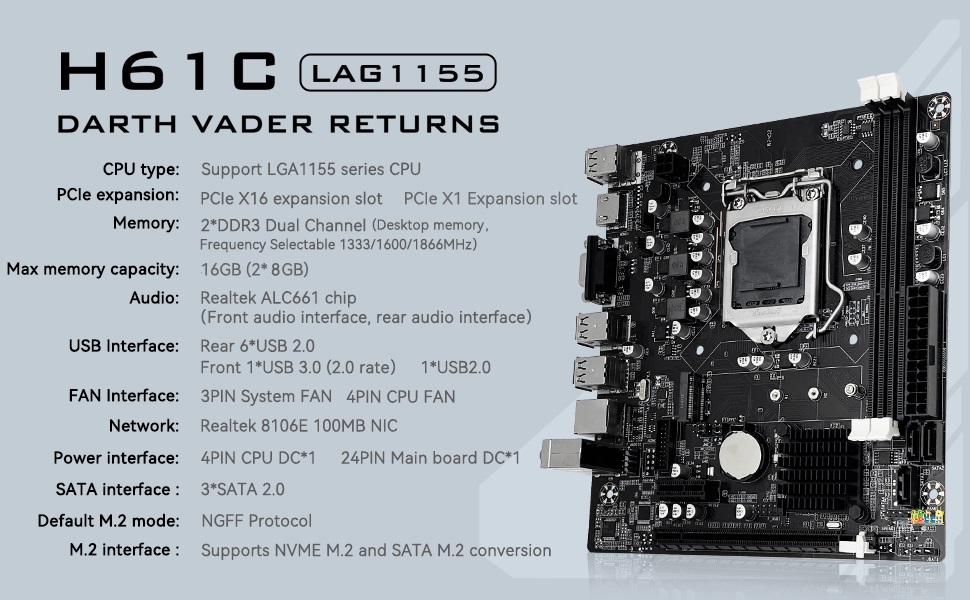
Intel LGA 1155 Socket: Supports Intel Core i3/i5/i7 2th or 3th generation processors, as well as Xeon E3 v2, Pentium and other series processors. (Eg Intel xeon E3-1280 V2, Intel Core i7-3770K, Intel Core i5-2500K, Pentium G620, G840, etc.)
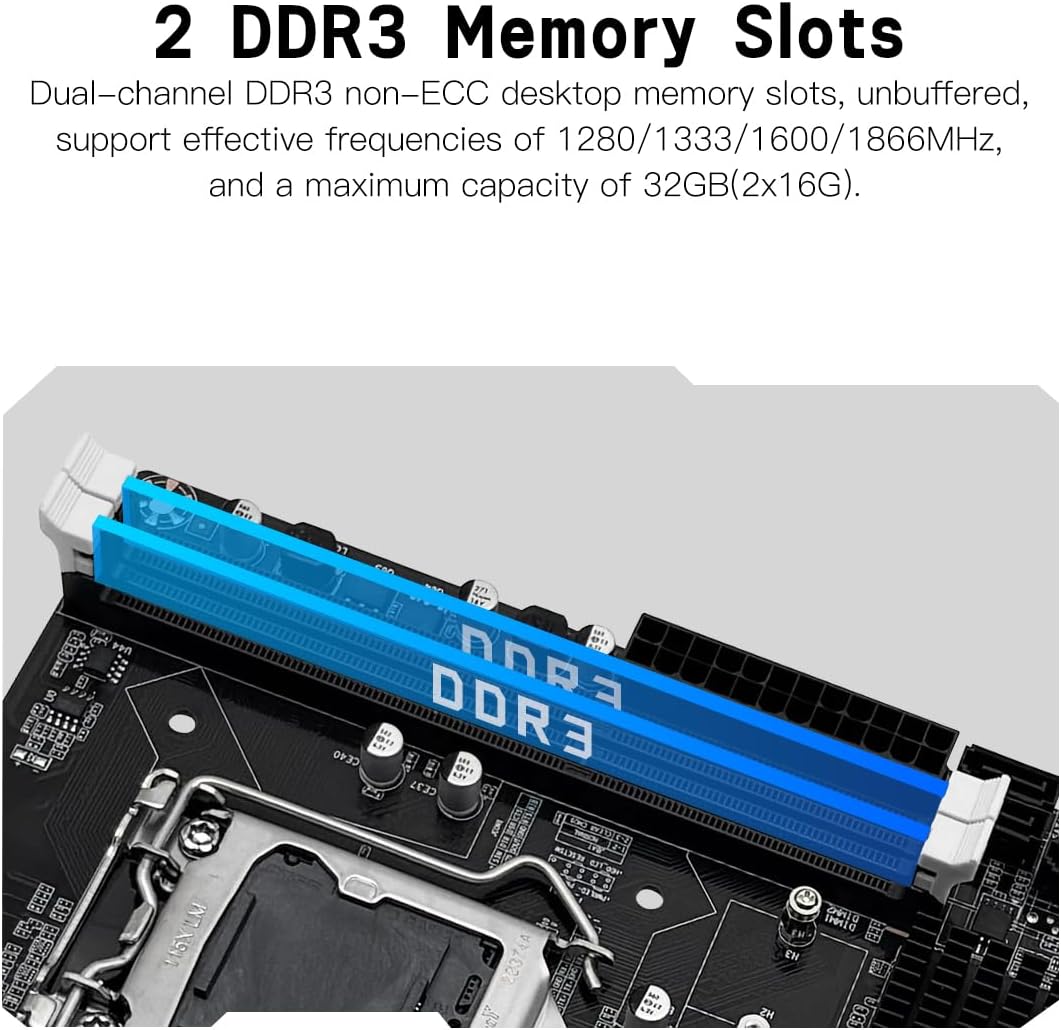
Dual-channel DDR3 Memory Slots: 2 DDR3 non-ECC desktop memory slots, unbuffered, support effective frequencies of 1280/1333/1600/1866MHz, and a maximum capacity of 16GB (Each memory slot supports 8GB)
NVME/NGFF M.2 SSD Interface: This H61 gaming motherboard is equipped with a M.2 interface, which can be converted between NVME and NGFF after debugging. NVME M.2 is transmitted through the PCI_E channel, with a maximum rate of 1535M/s (actual data). Also supports 2242, 2260 and 2280 M.2 SSDs
VGA and High Definition Multimedia Interface: It can support 1080P high-definition video output without a graphics card. Note: To use these two interfaces, your CPU needs to support integrated graphicsngff
The package includes: 1*H61 motherboard, 1*SATA cable, 1*I/O baffle. User manual is not included in the package, you can download the user manual file on the product details page. The CR2032 battery on the motherboard has been removed. It is not included in the package. Please purchase it yourself. If you need to download the driver, it is recommended to download: Driver Talent, or use Win 10 system
Tip 1: The CPUs of Intel Xeon E3 V1 and V2 series are server CPUs, and most of them do not have integrated graphics. Generally, only the CPU models with the suffix “5” have integrated graphics. For example: E3-1245, E3-1235 V2, E3-1275 V2 and other CPUs support integrated display. The Intel Core i3, i5 and i7 series processors almost all support integrated display, only the CPU model with the suffix “F” letter has no integrated display function, which is “ix-xxxxF”. Pentium and Celeron “G” All series of CPUs support integrated display, such as “G840”, “G630” and so on
Tip 2: If the system won’t power on and the fans don’t spin, verify the motherboard power and CPU power connections, confirm CPU and memory model compatibility and condition, and ensure the memory modules are properly seated; if the issue persists after checking these, clear the CMOS
Tip 3: If there’s no display (fans spin but keyboard lights remain unresponsive when pressing Caps Lock), verify the motherboard and CPU power connections, ensure memory modules are properly seated, and confirm CPU/memory model compatibility and condition; if issues persist after these checks, clear CMOS
Tip 4: If there’s no display (fans are spinning and the Caps Lock indicator lights up when pressing Caps Lock), verify the monitor is powered on and the display data cable is securely connected; if no external graphics card GPU is installed, confirm CPU support for integrated graphics; if an external graphics card GPU is installed, ensure the data cable is connected to its output port; check the condition of the display cable, GPU, and monitor; if the issue persists after these checks, clear CMOS
 Overview

Ricky Reid –
Need for more speed.
I used this board to rebuild a gamimg system. It’s been about 5 months and so far the board performs very well. I added an 1TB SSD and it performs flawless .
Mark W. –
Dead On Arrival! JUNK! DO NOT BUY!
Pros:NONE!Cons:Dead On Arrival!Tried 3 NEW power supplies, 12 sticks of RAM, 4 Different intel CPU’s all of which are liested as supported by the board, 3 CMOS NEW batteries, reset CMOS, and absolutely nothing except the CPU fan spun up.No signal on 3 different monitors from VGA or HDMI, NOTHING!Dead, completely DEAD!Machinist was zero help for drivers or a manual, responded on driver question with a link to a questionable site selling a subscription to a no name and not trustworthy driver updater, very unprofessional!Conclusion:I have been building PC’s as a qualified tech for 37 years and I actally know what I am doing and how to properly test hardware, si I know a Dead Motherboard when I encounter one. I am returning this useless piece of junk the day after I recieved it for a full refund, and I only wish I could charge Machinest for my wasted time as well as tying up my hard earned money whilst I wait for the return process to complete! I will never, ever buy a Machinest product again! I don’t believe this motherboard was ever tested, or that it passed quality control as stated all over the box! Stay away from their products as they offer zero support and seem rather shady!
Joshua holland –
Nice build
Ngl I expected it to be actually horrible but it’s not bad for the price it has a pretty easy bios and decent build
C. Sinclair –
Works which is what matters!
I have found the Machinist H81 Pro LGA 1150 mother board to be an adequate replacement for my dearly departed Gigabyte Z978-UD3H, which rudely took my I7-4790K CPU with it.Since I only needed to replace those items, and didn’t want to expend funds for a big budget update at this time I decided this would be the best option for now.So far I have had no issues with the board so felt comfortable in leaving this review now after having purchased the board in January 2024.If you need the user manual that does NOT come with the board a PDF can be downloaded from this item page under Product guides and documents section.My only complaint was with the positioning of the black jumpers that allow for use of BOTH Sata 3.0 internal connections. The board ships from factory with the jumpers already in the position for internal Sata M.2 leaving only ONE Sata 3.0 available for use.The retailer DOES state this in the item description.Since I am not using internal Sata M.2 I needed access to both Sata 3.0 internal connections.I didn’t find the instructions/images of the positioning clear enough that retailer listed.Looking up one of their other boards in the hope of finding better instructions/images, and assuming the boards would basically be of similar design I found their X79 V2.82H board which provided the instructions/images I needed to complete the jumper repositioning.My current case comes with case fan options, so I didn’t need to use the ONE only 3 pin fan connector available on the board.There IS a separate 4 pin CPU fan connector for CPU cooling.The first memory slot sits a little close to the CPU so with my Gammaxx cooler installed it’s a little tight but so far, no issues.For everyday usage NOT HEAVY GAMING this current setup is a fit for me.(New Setup 2024)NZXT Phantom 410 Mid Tower ATX CaseNZXT Power Supply C850 (replaced Corsair)Machinist H81 Pro Mother boardIntel I5-4590 CPU (purchased used through Amazon in 2024)Gammaxx 400 CPU CoolerCorsair Vengeance DDR3-1600 memory 2×8=16GBMSI GTX 970 Gaming Series Graphics CardSamsung SSD 500GBLG Internal Blue Ray player/burner(Old Setup from 2016)NZXT Phantom 410 Mid Tower ATX CaseCorsair Power Supply RM 850Gigabyte GA-Z97X-UD3H Mother boardIntel I7-4790K CPUGammaxx 400 CPU CoolerCorsair Vengeance DDR3-1600 memory 2×8=16GBMSI GTX 970 Gaming Series Graphics CardSamsung SSD 500GBLG Internal Blue Ray player/burner
Skyworks –
Mini ATX chihuahua con esteroides
(Oficialmente 6 meses funcionando sin fallas, se gano su 5ta estrella) Le instale un I7 de 3.6 de 4ta. generacion + geforce 2070 + x2 ddr3 16gb = 32gb de 1600MHz y aunque dice que soporta 32 de ram ( y los soporta ) pareciera que esta utilizando solo una direccion de canal de ram y me logro levantar 1300 – 1400 mhz estables, solo trae 4 salidas sata, y una de ellas no funcionaba, le instale 3 ssd + un m2 de 2tb, y la trasnferencia de datos del m2 no subia 2GB x seg, le probe con un m2 de 256gb y la velocidad de paso de informacion subio a 6gb x seg, al parecer hay una relacion tamaño espacio respecto a la funcionalidad del m2, en cambio la velocidad de trasnferencia de los sata es muy estable, recomiendo que le dejen el disco con el S.O. en las ranuras sata.a la PCIE logre sacarle los 8gb x seg. dando por aprobado las de video de 8GB, mas de eso no soportaA pesar que parece un DONGFENG con aspecto ferrari 😀 , todas sus funciones de overclock los trae de forma manual, asi que tienes que saber lo que haces si no quieres quemar tus componentes.La razon por la que le doy 4 estrellas es porque a pesar de su simplicidad y fallos a primera vista, si comparas todas las funciones que trae + su precio, con todas las del mercado, es una ganga!!!, sacando efectivamente la tarea para trabajos de oficina y entretenimiendo a mediana escala, y para cualquier entusiasta aprendiz del overclock, creo que es una excelente motherboard para aprender y a la vez darles utilidad a procesadores de 4ta generacion que tanto quieren sacar del mercado.Actualmente dejare esta PC minando crypto hasta que fallezca, forzandola al maximo de su actual capacidad, les avisare cuanto tiempo me dura, y por lo que me costo con gusto me la quedo hasta quemarla, creo que seria interesante montar una granja express con estas cosas tan varatas, y si soporta mas del año conmigo, definitivamente le dare la estrella que falta y me comprare un lote.Gracias por su tiempo, espero que mi reseña les sea de utilidad.
D7oom –
وصلني خربان المذربورد
Joe –
Ótima placa