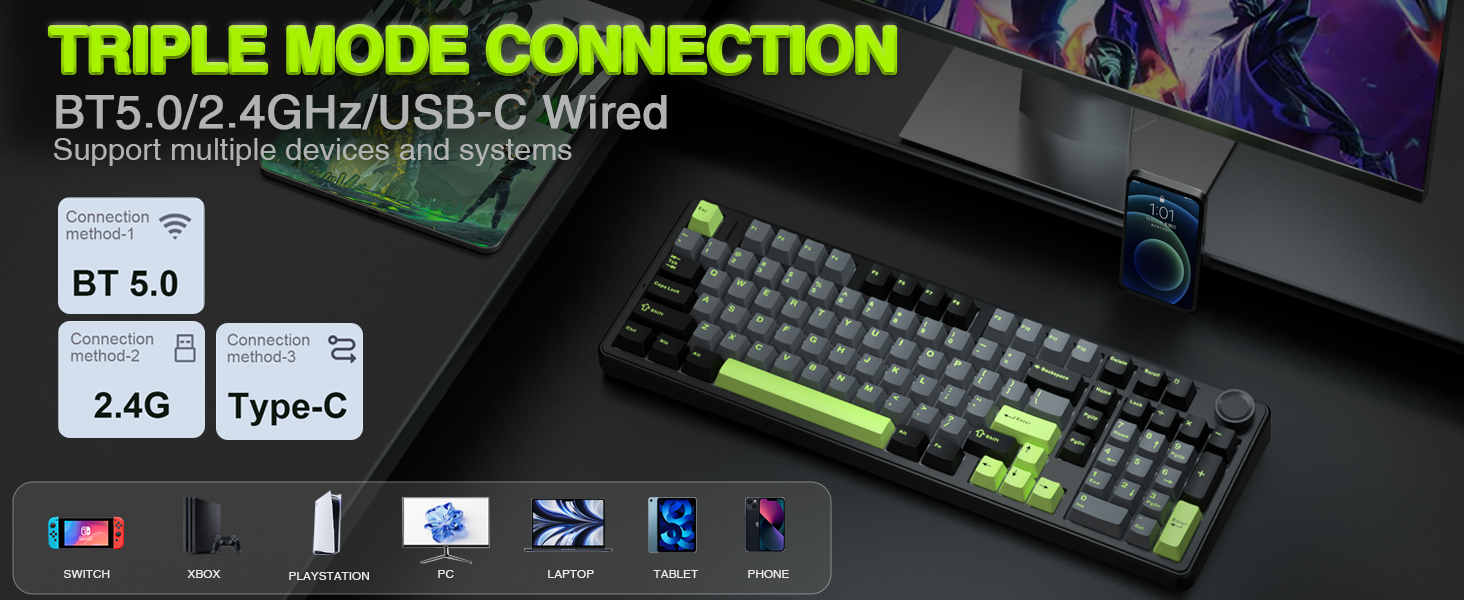
Connect via BT 3.0/5.0, 2.4GHz, or USB-C, and toggle between them instantly with a dedicated side switch.
8000mAh Battery
The large battery capacity extends wireless life. For optimal battery health, please avoid using fast-charging cables.
PBT Keycaps
Double-shot PBT keycaps fuse two colors into one, ensuring legends stay vibrant and wear-resistant.
Adjustable Kickstand
The keyboard has an adjustable kickstand for a more comfortable typing angle.
Partial FN+ Shortcut Key Functions Introduction
FN + Scroll = PRTSCFN + DEL = INSFN + Home = ENDFN + ESC : Press and hold for 4-5 seconds until the keyboard backlight flashes to restore factory settingsFN + WIN : Lock/unlock windows key (WIN key cannot be used when locked)FN + 1 = BT device 1# | FN + 2 = BT device 2# | FN + 3 = BT device 3#
Supports simultaneous connection of 3 devices in BT mode, and can switch devices via shortcut keys
FN + W = Windows system | FN + E = Mac system | FN + Q = Android system | FN + R = IOS system
In order to use some shortcut key functions normally, users can use shortcut keys to switch the keyboard to the same system mode as your device. The keyboard shortcut functions are different in different systems. For details, please refer to the instructions included in our package.
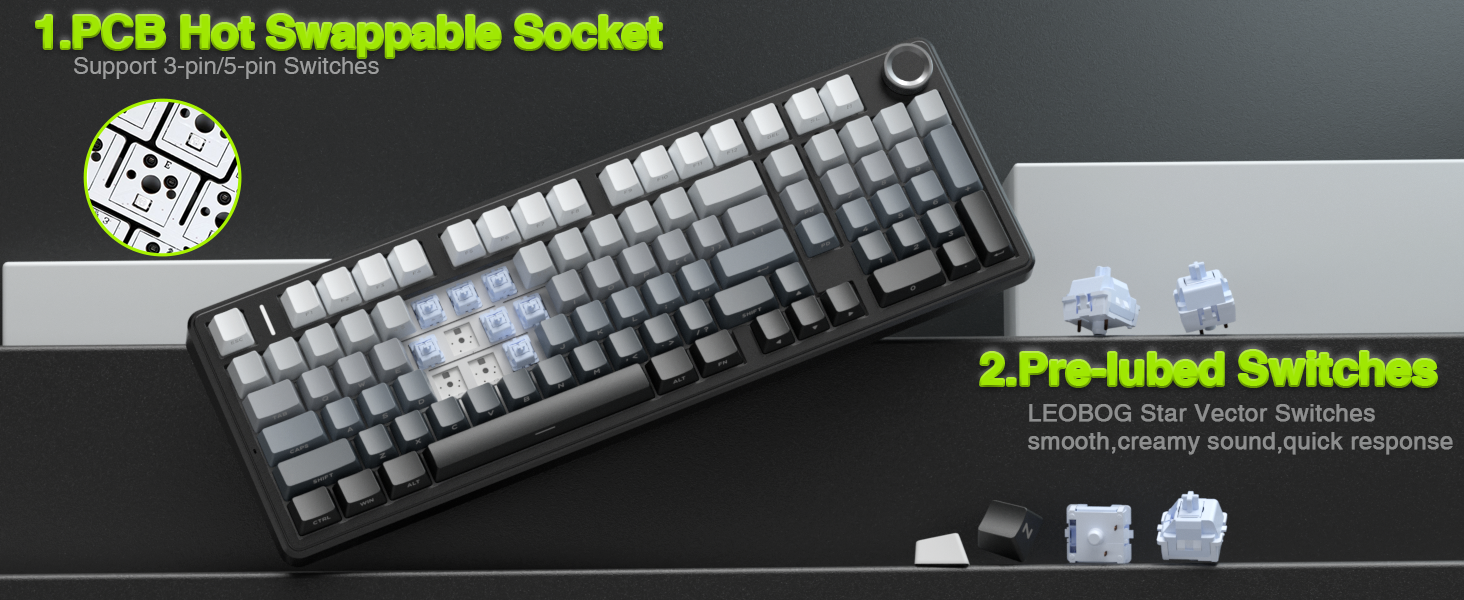
Multi-Device Connection: AULA F99 Pro wireless mechanical keyboard provides three connection methods, including BT5.0, 2.4GHz wireless mode, and USB wired mode. It can be connected to up to five devices at the same time, and switch between them easily by FN and key combination keys and side button. No limits about your keyboard connection to meet the needs of work, gaming, and study Multi-function Control Knob: This AULA 96% wireless gaming keyboard is equipped with functional knob to switch backlit mode or multimedia mode. In backlit mode, you can rotate the knob to adjust the brightness of the lights, and click the knob to switch the lighting effects easily; in multimedia mode, rotate the knob to adjust the volume, and click the knob to play or pause. Long press the knob for about 5 seconds to switch modes Hot-swappable Custom Keyboard: The switches and keycaps can be freely replaced(keycap/switch puller are included in the package).This customizable keyboard with hot-swap PCB allows users to replace 3 pins/5 pins switches easily without soldering issue. F99 Pro mechanical keyboards equipped with pre-lubed linear switches, bring smooth typing feeling and pleasant creamy mechanical sound, provide fast response for exciting game Gasket Structure and PCB Single Key Slotting: This computer keyboard features a advanced structure, extended integrated silicone pad, and PCB single key slotting, better optimizes resilience and stability, making the hand feel softer and more elastic. Five layers of filling silencer fills the gap between the PCB, the positioning plate and the shaft,effectively counteracting the cavity noise sound of the shaft hitting the positioning plate, and providing a solid feel Mechanical Gaming Keyboard: F99 Pro is a premium mechanical keyboard for both work and game. With 16 RGB lighting effect to adds a great atmosphere to the game room. Keys support macro customization, which allows macro recording and editing, customize key function and 16.8 million light colors, and supports cool music rhythm lighting effects with driver. N-key rollover, keyboard can respond to multiple key presses at the same time, which is helpful in very exciting real-time games PBT Keycaps and 8000mAh Battery: 99 keys 96% layout compact keyboard can save more desktop space while keep necessary arrow keys and number area for games and work. The rechargeable keyboard built-in 8000mAh large capcacity battery to provide more power and longer battery life. Double shot PBT keycaps, made from two colors material molded into each others, make the keycaps characters maintain the vibrance and saturation, clear and not fade
Specification
Overview
Customer Reviews
Rated 0 out of 5
9 reviews
Rated 5 out of 5
0
Rated 4 out of 5
0
Rated 3 out of 5
0
Rated 2 out of 5
0
Rated 1 out of 5
0
9 reviews for AULA F99 Pro Wireless Mechanical Keyboard with Knob,Gasket Structure,Tri-Mode BT5.0/USB-C/2.4GHz Hot Swappable Keyboard,Creamy Sound,RGB Backlit PBT Keycaps Computer Gaming Keyboards
Perfect! Beautiful, soft clicking sounds and incredible quality!
IT’S PERFECT. ABSOLUTELY INCREDIBLE!!! Literally everything I’ve wanted for in a keyboard. The sound is the most satisfying ever, soft clicks- very ASMR-friendly. The key caps feel so smooth and are excellent quality. The bluetooth connected seamlessly. Beautiful glow under the keys to light up the keyboard without being too much. Works very well and is very responsive. I tested out various typing games using it and had no issues whatsoever. 1000/10 recommend!!! Worth every penny, you won’t regret it 🤍 I took a picture of it in the dark and it looks so cool!
BUY IT!
I love this keyboard so much! The color of it is beautiful, I have gotten lots of compliments in the few days I have had it. It is heavy and sturdy and just feels like a nice keyboard. The keys are smooth and I like the feel of them without changing key caps. I never understood the creamy/chalky/wood soup sound TikTok was talking about but now I do. This keyboard sounds like all 3 of those descriptions. I work on a computer all day long but I dont type a WHOLE lot…but now I wish I typed more. Connection was SUPER easy, I literally just plugged it in and it was working. Also works with BT but I had some connectivity issues…not sure if it was my system or the keyboard itself there, but I just switched it to the dongle hookup and I havent had a problem since. Google is a better help for setting up the lights, etc than the little handbook that comes with it. Worth the price.
absolutely love it. Including the clicking.
OK, I have a surface pro 13 inch model 2024 and I did not want to get the official keyboard that connects to the bottom of it magnetic that’s used as a front case because I like to actually have something a little bit more physical.I was going through a few keyboards left and right trying to figure out exactly which one would work. I ended up going from mini keyboard to then one that opens left and right but they just felt awkward.Decided to get a standard mechanical keyboard because I’m not using it as a portable device. when I’m at the house it’s going to be in one place and when I’m moving I’ll use the touchscreen function.I was looking through multiple keyboard before I landed on this one took a chance and I’m in love with it. Definitely a vendor I’m looking for the future whenever I want any more PC related items.The brightness of the keyboard is super bright and the battery it’s been working almost a month and still at 92% battery life the keyboard automatically sleep after a couple minutes so you can stop typing go do something else or simply just read and use it like a standard mouse if you have a separate mouse attachment. For my set up it’s a surface pro on a stand, and then basically the wireless keyboard underneath it and a separate wireless mouse.The color of it is beautiful. I like the green with the black I wasn’t sure exactly how it would look like because the image it looks nice but it’s one of those things you have to have right in front of you. Even in daylight the brightness of the LEDs are noticeable I’ve been using everything straight out of the box, no software , no brightness increase no lowering just the default setting and it’s noticeable even in daylight and more noticeable at night time.It has a very good weight to it. It basically feels like a well constructed product, higher end and heavy duty in a positive way and I love the sound of the keyboard!exactly like how the video on the Amazon website described it and showed it in real time. Easy to type, which is the main reason I purchased one that was more of a standard keyboard rather than the gimmick key minis or the more portable kind that fold. They’re just not for me.This one is perfect because I have access to all the keys. Some of the other set up like the minis or the foldable have keys that’s something sometimes do double duty and they don’t automatically translate but because these have the full set of keys, the escape works like a standard button along with all the standard Microsoft shortcuts.It has all the shortcuts and it comes with a piece of paper that shows you how to set it up and the basic function. It’s pretty straightforward. You can also connect to three different device devices and switch in between one. I’m only using it in one. All Microsoft function shortcuts seem to work.Ask for the LED it’s actually pretty cool and I’m surprised the battery life is immense on it. I thought it would be less but nope. because the keyboard only shows the LEDs affect or turned on when you’re physically using it the moment you get your hand off the keyboard after a couple seconds I believe 30 seconds it goes to a semi sleep and the LED shuts off now if you walk away from the keyboard or computer or you’re reading something heavily with the mouse.The keyboard will go into a deeper sleep, but it has to be at least 20-30 minutes and up. if it goes to have a sleep mode, it wakes up the moment you press a button. It’s one of those things you have to get used to because it’s not physically plugged in. Again I don’t have any complaints because the battery life is insane and the software really extends the battery life.it does take about 2 to 3 hours to complete charge but 100% worth it. I’m going on a full month and at 92%. Another thing I wanted to add is that the LED function might seem confusing but there’s one for multiple colors like green, blue, lime, red, etc., etc., and another function for the effects.The way that it goes like this, choose an effect: glowing, solid color, dragging or multi burst mode in the keyboard when you do that you then switch the colors and select the color you want: multicolor, red static , glowing, heartbeat, and go from there you’re done. Easiest pie.Example of this would be heartbeat effect with a solid green color. Or the light moving around as you type as the effect, but you choose instead of a static color, multiple colors or rainbow effect etcIt’s a standard keyboard nothing to say negative. It’s nice big and looks professional. I love it.
Don’t Let Negative Reviews Fool You: This Keyboard Is a Game-Changing Gem!
I’ve seen a lot of negative reviews on this product, but truly I can’t complain. The battery lasts forever. I’ve had it for 2 weeks already and it’s still at 100% battery, even though I work for 8 hours a day on it, so even with heavy use the battery life is phenomenal. Typing is super satisfying. The clicking sounds is very enjoyable. I haven’t tried to download the application for further customization, but really, it’s not needed. If you read the instructions that come with it, you can easily switch the keyboard for optimal keyboard layout for windows, mac, iOS or android, but even with all that I prefer the windows layout even for my mac or iPad. I don’t buy super high-end keyboards so I can’t compare it to a high tech $300 dollar keyboard that gamers use, but this is definitely the best keyboard I have ever used. It doesn’t hurt to give it a try. If you don’t like it just return it. I however am very satisfied and will be using it for everything. I also absolutely love how easy it is to switch between devices with simple commands. It’s not ideal for travel because it’s on the heavier side for keyboards, but it’s great to have on your desk. The sturdy, heavier build feels premium on my desk.
So much creamy sound
This was the first hotswappable mechanical keyboard I ever purchased and love it. I saw some ads for it on TikTok and the sound was exactly what I was looking for and being able to turn the lights off and have a non lit up gradient color scheme is really neat looking as well.It is constructed fairly well and is heavy so it feels good all around. The usb port is usb C and also allows for wireless 2.4 and Bluetooth so you can use it for almost anything.Rating it as a 4 star because I’ve had a single key where the blue led stopped working. Not the end of the world since I can use other colors but worth mentioning. Also, this listing says it is an F99 pro which it is not since the non pro model is shown. The F99 pro has the knob.
Impressive keyboard!
Bought this keyboard for my WFH setup and I’m impressed! You can connect it wirelessly w/ BT or the USB receiver or connect it with a USB-C cable (included). I have it connected via BT to my Windows PC and there’s zero lag. I also like the fact that you can select the WIN mode and use the knob to adjust the volume & things so functionality seems pretty good. And I LOVE the feel & sound of the keys, the color modes are super cute, definitely has some weight to it and doesn’t feel cheap. If you’re hesitant don’t be, BUY this, you won’t be disappointed!!
Es un excelente teclado. Excelente precio! El sonido es super creamy justo lo que estaba buscando. Tiene muchisimos diseños de luz y aunque conectado alambricamente su rendimiento es excelente, también el rendimiento al tenerlo inalambrico muy bueno, tal vez un poco más lento. Lo uso pincipalmente para trabajo,aún lo he usado muy poco para jugar pero aún no tengo ningun pero.





 Overview
Catherine Anne –
Perfect! Beautiful, soft clicking sounds and incredible quality!
IT’S PERFECT. ABSOLUTELY INCREDIBLE!!! Literally everything I’ve wanted for in a keyboard. The sound is the most satisfying ever, soft clicks- very ASMR-friendly. The key caps feel so smooth and are excellent quality. The bluetooth connected seamlessly. Beautiful glow under the keys to light up the keyboard without being too much. Works very well and is very responsive. I tested out various typing games using it and had no issues whatsoever. 1000/10 recommend!!! Worth every penny, you won’t regret it 🤍 I took a picture of it in the dark and it looks so cool!
Jamie G –
BUY IT!
I love this keyboard so much! The color of it is beautiful, I have gotten lots of compliments in the few days I have had it. It is heavy and sturdy and just feels like a nice keyboard. The keys are smooth and I like the feel of them without changing key caps. I never understood the creamy/chalky/wood soup sound TikTok was talking about but now I do. This keyboard sounds like all 3 of those descriptions. I work on a computer all day long but I dont type a WHOLE lot…but now I wish I typed more. Connection was SUPER easy, I literally just plugged it in and it was working. Also works with BT but I had some connectivity issues…not sure if it was my system or the keyboard itself there, but I just switched it to the dongle hookup and I havent had a problem since. Google is a better help for setting up the lights, etc than the little handbook that comes with it. Worth the price.
Aiden –
absolutely love it. Including the clicking.
OK, I have a surface pro 13 inch model 2024 and I did not want to get the official keyboard that connects to the bottom of it magnetic that’s used as a front case because I like to actually have something a little bit more physical.I was going through a few keyboards left and right trying to figure out exactly which one would work. I ended up going from mini keyboard to then one that opens left and right but they just felt awkward.Decided to get a standard mechanical keyboard because I’m not using it as a portable device. when I’m at the house it’s going to be in one place and when I’m moving I’ll use the touchscreen function.I was looking through multiple keyboard before I landed on this one took a chance and I’m in love with it. Definitely a vendor I’m looking for the future whenever I want any more PC related items.The brightness of the keyboard is super bright and the battery it’s been working almost a month and still at 92% battery life the keyboard automatically sleep after a couple minutes so you can stop typing go do something else or simply just read and use it like a standard mouse if you have a separate mouse attachment. For my set up it’s a surface pro on a stand, and then basically the wireless keyboard underneath it and a separate wireless mouse.The color of it is beautiful. I like the green with the black I wasn’t sure exactly how it would look like because the image it looks nice but it’s one of those things you have to have right in front of you. Even in daylight the brightness of the LEDs are noticeable I’ve been using everything straight out of the box, no software , no brightness increase no lowering just the default setting and it’s noticeable even in daylight and more noticeable at night time.It has a very good weight to it. It basically feels like a well constructed product, higher end and heavy duty in a positive way and I love the sound of the keyboard!exactly like how the video on the Amazon website described it and showed it in real time. Easy to type, which is the main reason I purchased one that was more of a standard keyboard rather than the gimmick key minis or the more portable kind that fold. They’re just not for me.This one is perfect because I have access to all the keys. Some of the other set up like the minis or the foldable have keys that’s something sometimes do double duty and they don’t automatically translate but because these have the full set of keys, the escape works like a standard button along with all the standard Microsoft shortcuts.It has all the shortcuts and it comes with a piece of paper that shows you how to set it up and the basic function. It’s pretty straightforward. You can also connect to three different device devices and switch in between one. I’m only using it in one. All Microsoft function shortcuts seem to work.Ask for the LED it’s actually pretty cool and I’m surprised the battery life is immense on it. I thought it would be less but nope. because the keyboard only shows the LEDs affect or turned on when you’re physically using it the moment you get your hand off the keyboard after a couple seconds I believe 30 seconds it goes to a semi sleep and the LED shuts off now if you walk away from the keyboard or computer or you’re reading something heavily with the mouse.The keyboard will go into a deeper sleep, but it has to be at least 20-30 minutes and up. if it goes to have a sleep mode, it wakes up the moment you press a button. It’s one of those things you have to get used to because it’s not physically plugged in. Again I don’t have any complaints because the battery life is insane and the software really extends the battery life.it does take about 2 to 3 hours to complete charge but 100% worth it. I’m going on a full month and at 92%. Another thing I wanted to add is that the LED function might seem confusing but there’s one for multiple colors like green, blue, lime, red, etc., etc., and another function for the effects.The way that it goes like this, choose an effect: glowing, solid color, dragging or multi burst mode in the keyboard when you do that you then switch the colors and select the color you want: multicolor, red static , glowing, heartbeat, and go from there you’re done. Easiest pie.Example of this would be heartbeat effect with a solid green color. Or the light moving around as you type as the effect, but you choose instead of a static color, multiple colors or rainbow effect etcIt’s a standard keyboard nothing to say negative. It’s nice big and looks professional. I love it.
Michael Soria Cabrera –
Don’t Let Negative Reviews Fool You: This Keyboard Is a Game-Changing Gem!
I’ve seen a lot of negative reviews on this product, but truly I can’t complain. The battery lasts forever. I’ve had it for 2 weeks already and it’s still at 100% battery, even though I work for 8 hours a day on it, so even with heavy use the battery life is phenomenal. Typing is super satisfying. The clicking sounds is very enjoyable. I haven’t tried to download the application for further customization, but really, it’s not needed. If you read the instructions that come with it, you can easily switch the keyboard for optimal keyboard layout for windows, mac, iOS or android, but even with all that I prefer the windows layout even for my mac or iPad. I don’t buy super high-end keyboards so I can’t compare it to a high tech $300 dollar keyboard that gamers use, but this is definitely the best keyboard I have ever used. It doesn’t hurt to give it a try. If you don’t like it just return it. I however am very satisfied and will be using it for everything. I also absolutely love how easy it is to switch between devices with simple commands. It’s not ideal for travel because it’s on the heavier side for keyboards, but it’s great to have on your desk. The sturdy, heavier build feels premium on my desk.
Mike W. –
So much creamy sound
This was the first hotswappable mechanical keyboard I ever purchased and love it. I saw some ads for it on TikTok and the sound was exactly what I was looking for and being able to turn the lights off and have a non lit up gradient color scheme is really neat looking as well.It is constructed fairly well and is heavy so it feels good all around. The usb port is usb C and also allows for wireless 2.4 and Bluetooth so you can use it for almost anything.Rating it as a 4 star because I’ve had a single key where the blue led stopped working. Not the end of the world since I can use other colors but worth mentioning. Also, this listing says it is an F99 pro which it is not since the non pro model is shown. The F99 pro has the knob.
LalindaXO –
Impressive keyboard!
Bought this keyboard for my WFH setup and I’m impressed! You can connect it wirelessly w/ BT or the USB receiver or connect it with a USB-C cable (included). I have it connected via BT to my Windows PC and there’s zero lag. I also like the fact that you can select the WIN mode and use the knob to adjust the volume & things so functionality seems pretty good. And I LOVE the feel & sound of the keys, the color modes are super cute, definitely has some weight to it and doesn’t feel cheap. If you’re hesitant don’t be, BUY this, you won’t be disappointed!!
Rkosa –
Excellent
عبدالاله –
فوق الوصف صراحه سرعه وشكل وجودة عاليه جدا
Karen Delgado –
Es un excelente teclado. Excelente precio! El sonido es super creamy justo lo que estaba buscando. Tiene muchisimos diseños de luz y aunque conectado alambricamente su rendimiento es excelente, también el rendimiento al tenerlo inalambrico muy bueno, tal vez un poco más lento. Lo uso pincipalmente para trabajo,aún lo he usado muy poco para jugar pero aún no tengo ningun pero.